Choose Adobe Photoshop if…
The image itself needs specialist attention: detailed retouching, complex masks, RAW adjustments, Smart Objects, or a layered PSD handoff. Photoshop's editing depth is the reason to choose it.
Krevaya vs Photoshop
Photoshop gives image makers precise control over their work. Krevaya Studio helps you create everyday social visuals and move them straight into a complete posting workflow.
Studio from $19/month on Essentials; Krevaya AI from $29/month on Plus. Usage limits apply. Compare plans
The image itself needs specialist attention: detailed retouching, complex masks, RAW adjustments, Smart Objects, or a layered PSD handoff. Photoshop's editing depth is the reason to choose it.
You need branded social posts and carousels, editable templates, original visuals, captions, and a publishing calendar together. Your priority is taking everyday content from idea to approved post.
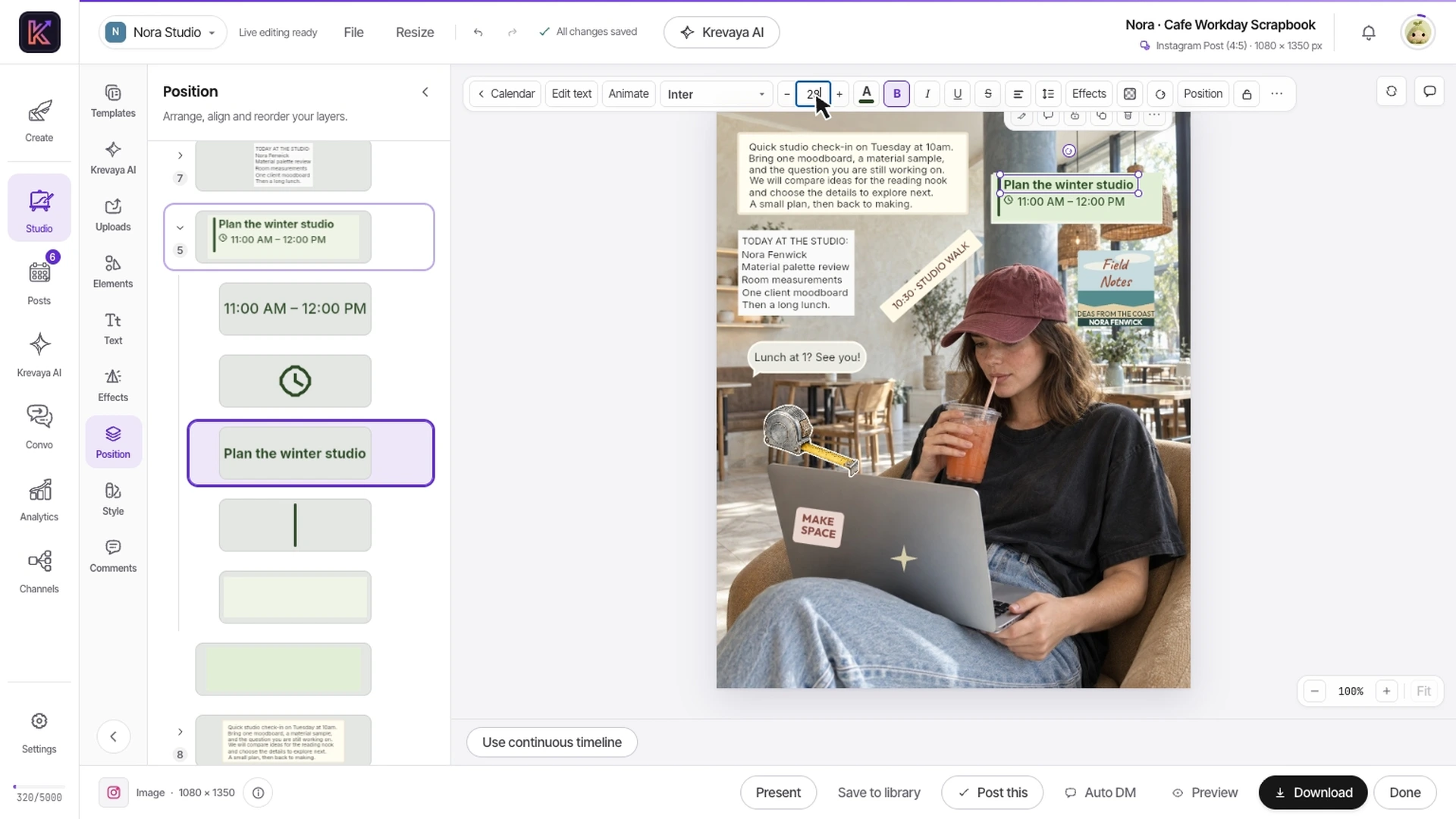
Watch independently editable text and artwork in a real Studio template. Compare the revisions you make most often with the specialist image work you still need Photoshop for.
Recorded in Krevaya Studio: edit the independent text layer in Cafe Workday Scrapbook, then trim footage, animate text, adjust audio, and start a video export in Café Serif Perspective. Original template colors and aspect ratios are preserved. Sample projects; no social post is published. Playback is sped up 1.45×.
Choose a Studio template and replace its sample words and photos. Keep the layout editable so the next revision can target one object.
Apply your brand color to the template's bound accents, preserving the rest of the authored design. Review readability and keep manual color control available.
Bring the creation into a post, write the caption, and check the destination before scheduling. Keep complex retouching or pixel work in a specialist editor when needed.
| Feature | Krevaya | Adobe Photoshop |
|---|---|---|
| Pricing model | Essentials starts at $19/mo for Studio, Posts, and Convo with AI disabled. Plus adds AI from $29/mo. Plan limits apply | Paid Photoshop and Creative Cloud subscriptions. Price, included apps, and commitment vary by plan and region |
| Everyday social design | Start with a social template, replace text and photos, edit the layers, and prepare the post in the same workspace | Compose images and graphics with layers, typography, selections, and effects |
| Photo retouching and compositing | Photo placement, crops, layered creations, and AI visuals for social content | Detailed selections and masks, healing and cloning, adjustment layers, Smart Objects, and RAW editing |
| Editable layers | Independently editable text, photos, and ornaments, with brand colors applied to template accents | Deep layer controls, blending, masks, Smart Filters on desktop, and native PSD workflows |
| AI image work | Generate original visuals and reuse them from your media library; AI credits apply | Generate Image, Generative Fill, Generative Expand, and other image-editing AI features; credit rules apply |
| Carousels and mixed media | Edit a carousel's pages together, or work with video and audio in Studio | Primarily an image-editing workflow; Adobe offers additional creative apps in its wider subscriptions |
| Writing, review, and publishing | AI caption writing, per-channel review, scheduling, and post analytics in the same product | Photoshop's cited features center on creating and exporting artwork, rather than a social publishing calendar |
Shaded cells indicate the stronger option for that row. Unshaded rows reflect a tie or a difference in approach.
Adobe Photoshop information was checked against its public pages on 2026-10-21; later checks are dated on the individual rows. Pricing and features can change. Let us know if something needs updating.
This comparison is written by Krevaya. Adobe Photoshop is not affiliated with Krevaya. The workflow guide was updated on 2026-11-05; competitor facts retain the verification date above.
Pick a recurring announcement, tip, or promotion. Identify which parts need frequent changes and which image-editing operations are essential.
Try a Studio template with your copy and media. Keep your PSD source file: a flattened export does not transfer Photoshop's layers, masks, or effects.
Review the design at its intended size, then add the caption and publishing schedule. Compare the complete job with your existing process.
Check channel support and current plan limits for the workflow you intend to move.
Create your account, choose a plan, and move one real post across before you decide.
Try a plan for 7 days. Card required.
Pick Krevaya when: You need branded social posts and carousels, editable templates, original visuals, captions, and a publishing calendar together. Your priority is taking everyday content from idea to approved post.
Pick Adobe Photoshop when: The image itself needs specialist attention: detailed retouching, complex masks, RAW adjustments, Smart Objects, or a layered PSD handoff. Photoshop's editing depth is the reason to choose it.
Krevaya: Essentials starts at $19/mo for Studio, Posts, and Convo with AI disabled. Plus adds AI from $29/mo. Plan limits apply. Adobe Photoshop: Paid Photoshop and Creative Cloud subscriptions. Price, included apps, and commitment vary by plan and region. Verified against Adobe Photoshop's own published pricing on 2026-10-21.
Photo retouching and compositing: Detailed selections and masks, healing and cloning, adjustment layers, Smart Objects, and RAW editing. Editable layers: Deep layer controls, blending, masks, Smart Filters on desktop, and native PSD workflows.
Krevaya does not provide editable Photoshop-project import. Upload a compatible exported image or rebuild the layout using separate Studio text, photo, and shape layers. Keep the original PSD when you need its masks, effects, or other Photoshop-specific structure.
Krevaya is designed for social creations and publishing. For demanding pixel editing, detailed masks, compositing, and professional retouching, compare the required operations directly and keep Photoshop where that specialist control is necessary.