Skip to content
Krevaya

Krevaya vs Canva

A Canva alternative for the whole social post

Your next post needs more than a finished image. Krevaya brings editable images, carousels, and short videos together with channel-specific captions, review, and scheduling. Built for creators and small businesses making social content every week.

Studio from $19/month on Essentials; Krevaya AI from $29/month on Plus. Compare plans

Cafe Workday Scrapbook, an editable image template in Krevaya StudioBlue Audience Design Guide, an editable 7-page carousel template in Krevaya StudioOlive Wellness Introduction, an editable image template in Krevaya Studio

Choose around the work you do every week

Searching for an alternative to Canva usually starts with a specific friction: another caption to write, another export to upload, another client revision. Start there when you compare.

Choose Krevaya if…

Your daily work is social content: find an idea, write in your voice, customize an image, carousel, or video, review the post, and schedule it. You want that workflow and Convo in one workspace.

  • Edit an image, a carousel, or a short video in Studio.
  • Keep each channel’s caption and preview beside the creation.
  • Review, schedule, and follow up with Instagram or Facebook DM workflows.

Choose Canva if…

You need a large design and asset library for presentations, documents, whiteboards, websites, and print as well as social content. Canva also offers brand controls, collaboration, and social scheduling on eligible plans.

  • A free editor matters more than a bundled publishing workflow.
  • Presentations, print, and documents are part of your regular workload.
  • Your team already relies on Canva’s library and brand processes.

Watch four real tasks in Krevaya

Native Krevaya screens, actual templates, and sample projects. Open any video full size for a closer look.

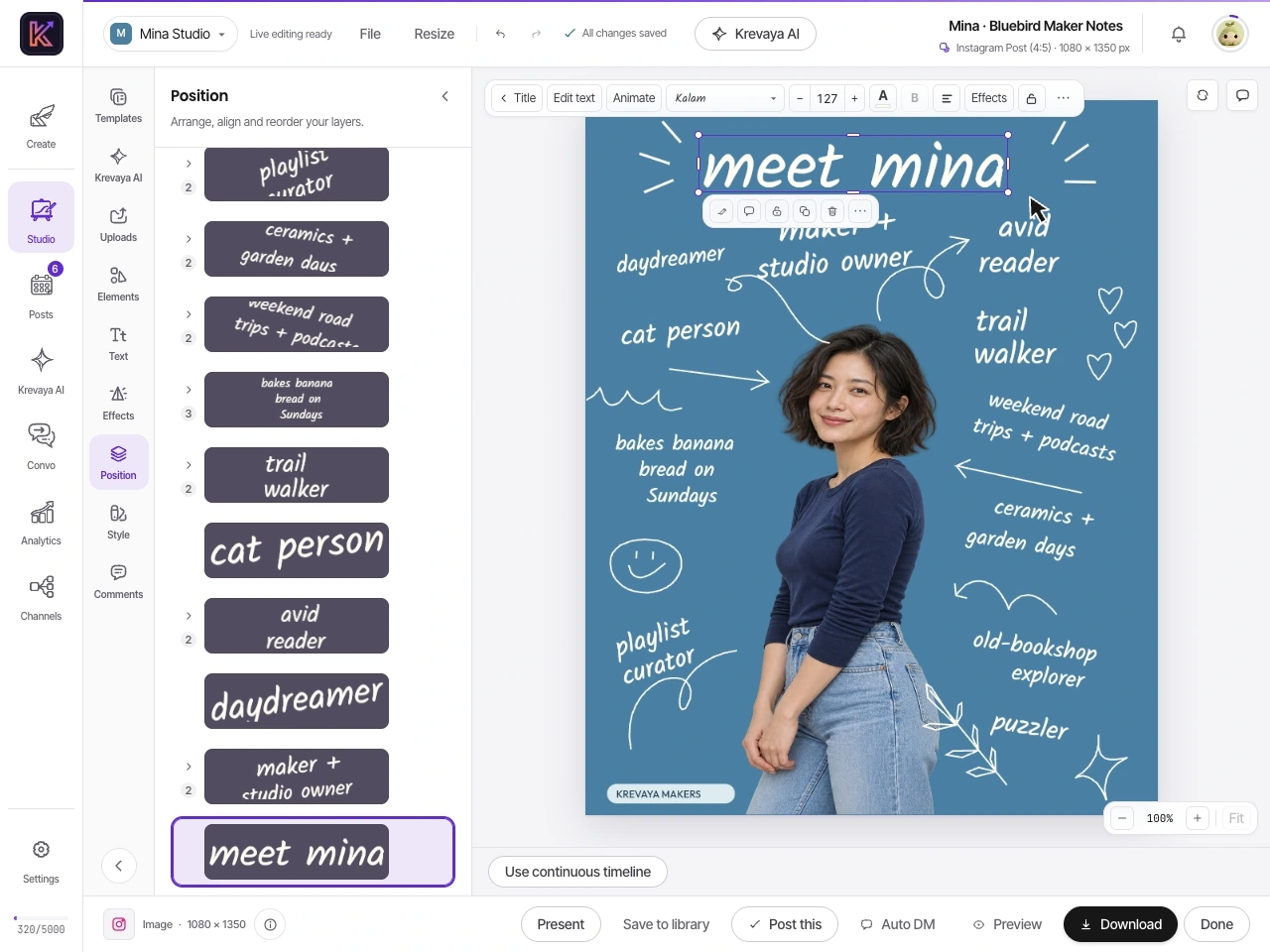
Change the headline and keep the design

Rewrite a headline, resize the type, and move the portrait as a separate layer in the Bluebird Maker Notes template. The lettering, blue background, and ornaments remain part of the editable creation.

Manual editing · Essentials and up · 0:18Explore image editing

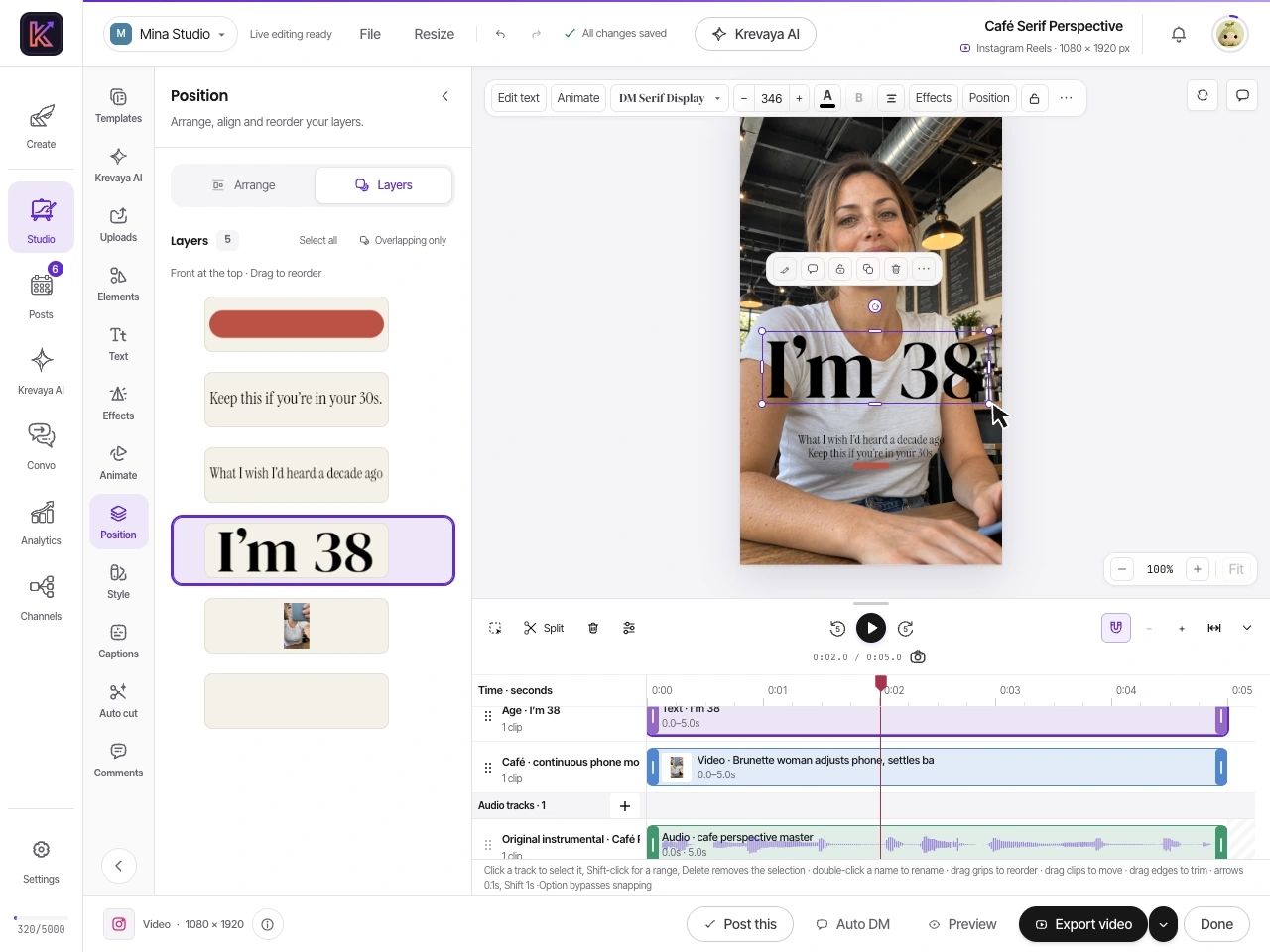
Give the clip its own finishing touches

Move and enlarge a headline, trim the footage, rewrite the text, and play the result. Café Serif Perspective keeps its vertical composition while you edit the text and video independently.

Manual editing · Essentials and up · 0:21Explore video editing

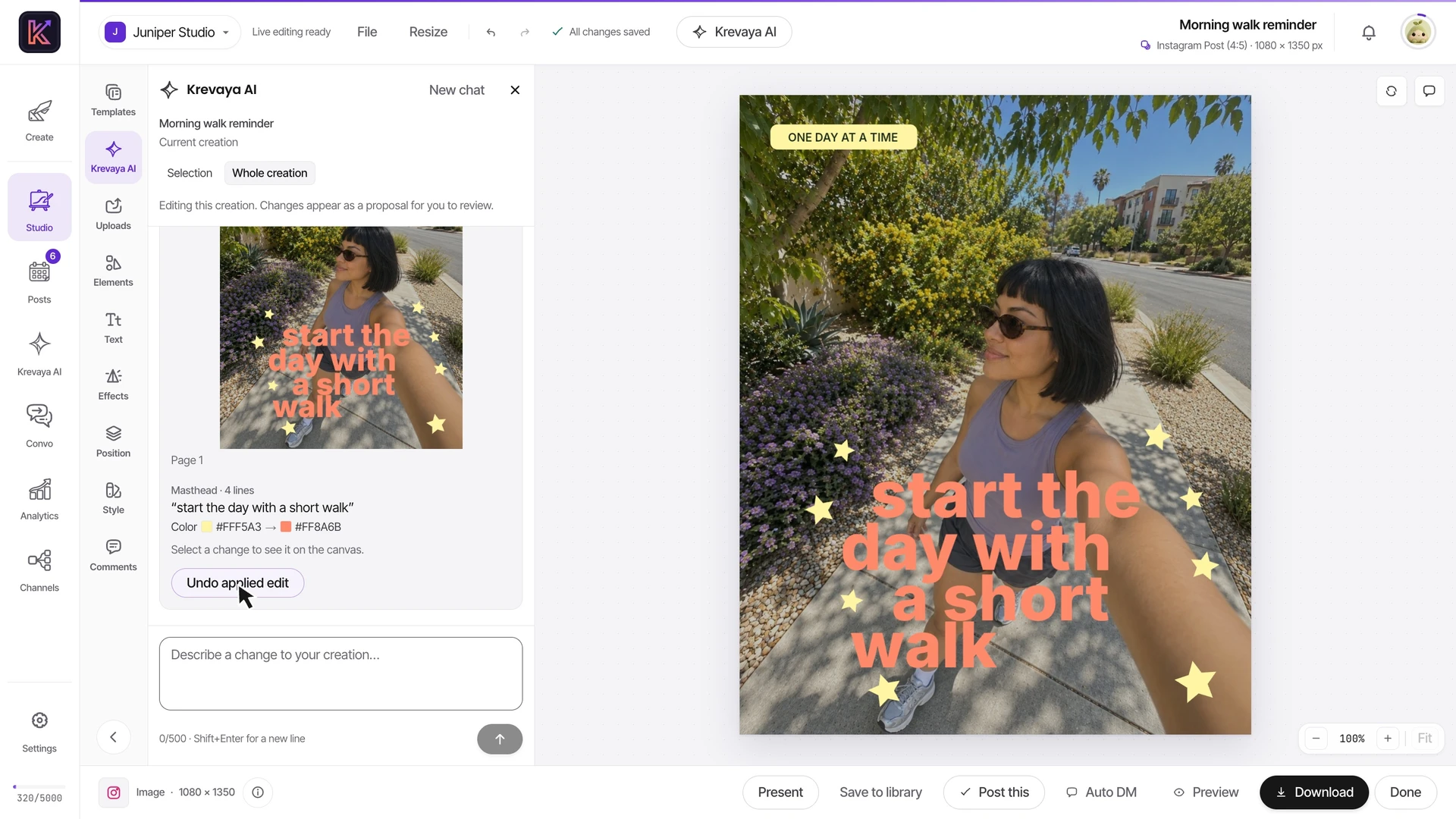
Ask for a revision you can still edit

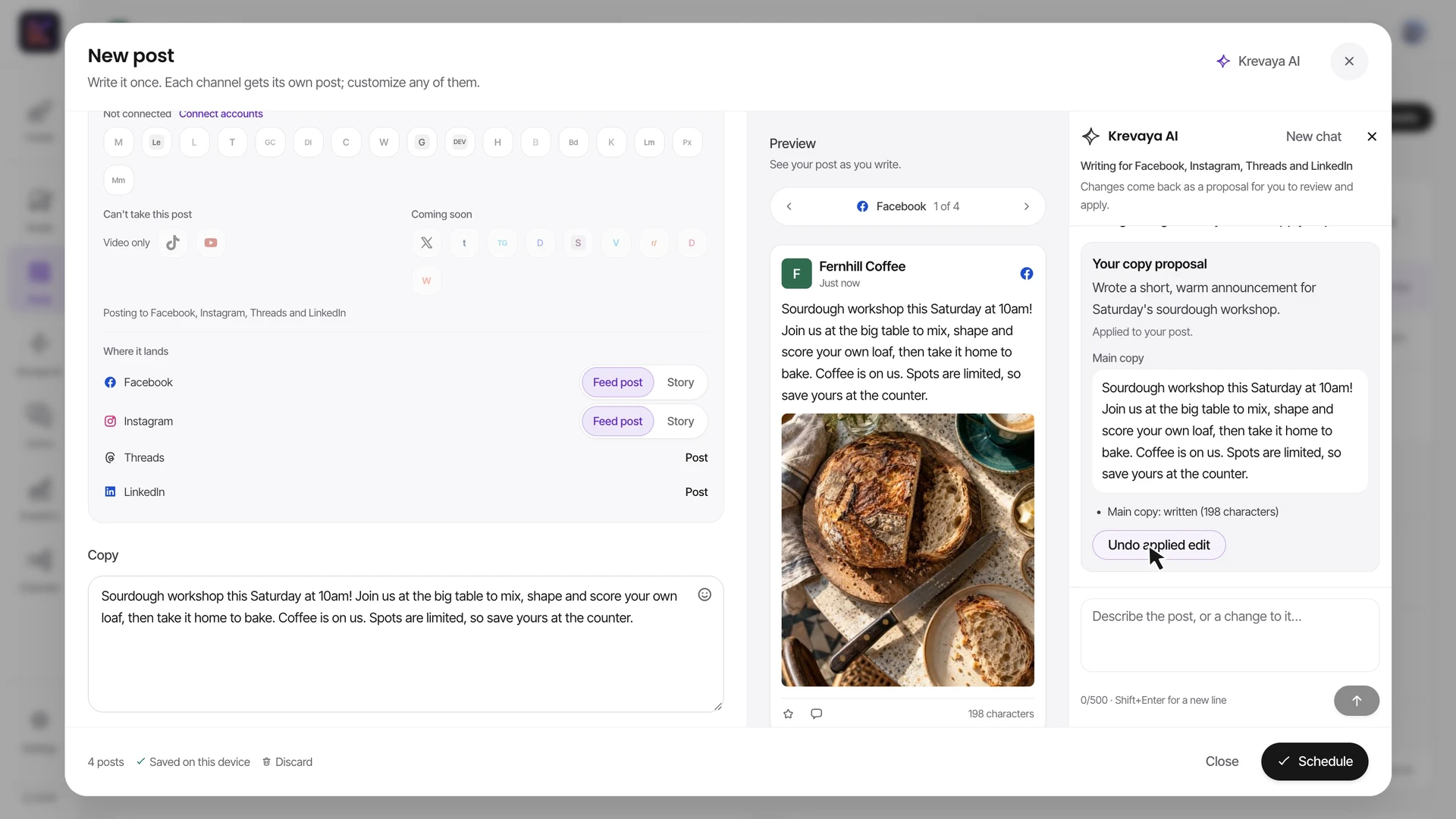
Ask Krevaya AI to revise an image, update a carousel page, or change timestamps in a video. Inspect the proposed changes before applying them to the existing layers; Undo restores the previous version.

AI assistance · Plus and up · 1:25Explore Krevaya AI

Finish the post, then fill the calendar

Watch a sample café prepare image posts, a carousel, Stories, and short videos. Give LinkedIn its own copy, review Instagram hashtags, and choose the channel, placement, and time in the composer.

Scheduling from Essentials · AI from Plus · 1:48Explore the publishing workflow

Krevaya vs Canva: features and pricing

Both products offer design tools, AI, and social scheduling. The choice comes down to the range of design work you need and how you want to handle the rest of a social post.

Krevaya vs Canva: design, video, AI, publishing, and pricing
What matters to youKrevayaCanva
Pricing modelStudio, Posts, and Convo start at Essentials $19/mo with 25 connected accounts. AI starts with Plus. Usage limits apply. Essentials includes Studio and scheduling with AI disabledFree, Pro for individuals, Business priced per person, and custom Enterprise plans; AI extras can cost more
Free design editorStudio is included on paid plans, from EssentialsCanva Free includes its design editor and a selection of templates and assets
Breadth of design workSocial images, editable carousels, video, and audio in StudioSocial designs plus presentations, documents, whiteboards, websites, and print products
Templates and assetsA curated social-template catalog with independently editable text, photos, and graphic elementsA much larger general-purpose template and stock library, with premium content on paid plans
Brand toolsBrand colors on template accents, reusable media, and a writing persona for your brandBrand Kits for logos, colors, fonts, and assets, with broader controls on Business and Enterprise
AI assistanceAI writing and generated visuals from Plus; manual editable creations from Essentials; trend discovery on Ultra and up. AI credits applyAI writing, design, image editing, and generation; features and usage vary by plan
Short video editingTrim clips, edit and animate text, adjust audio, and export MP4 in Studio from Essentials; AI video features have separate plan and credit limitsA free video editor with a multi-layer timeline, trimming, text, animation, and captions; premium assets and AI tools vary by plan
Social schedulingA publishing calendar with per-channel copy, review, and scheduling for connected accountsContent Planner schedules designs on eligible plans; Canva documents one social platform per scheduled design at a time
Collaboration and approvalsA review queue, client review links, and teammate permissions tied to publishingDesign collaboration and approval workflows on eligible plans, plus Enterprise governance
From post to conversationCreate in Studio, publish in Posts, and run Instagram/Facebook DM workflows in ConvoA design-centered workflow with sharing, scheduling, and a broad app ecosystem

Shaded cells indicate the stronger option for that row. Other rows describe differences in approach. Canva facts were checked on 2026-11-06; see the sources and comparison method.

Sources for the Canva comparison

Written by Krevaya and updated . Krevaya features and prices follow the shipped product and plan catalog. Canva information comes from the public pages below, checked on 2026-11-06. This is a vendor comparison, not an independent review or a hands-on benchmark of Canva.

The videos show recorded Krevaya sample projects; some playback and AI waiting time are shortened. Template previews use the actual Studio library artwork. Canva is not affiliated with Krevaya. Plans and features can change; tell us if something needs correcting.

Is Krevaya cheaper than Canva?

That depends on what you use. Canva offers a free design editor and paid plans for individuals and teams. Krevaya bundles creation and publishing tools, so compare it with your actual design, scheduling, and DM needs. Keeping a free editor can be the better value when you only need an occasional graphic.

Essentials is $19/month: Studio images, carousels, and video, manual editing and MP4 export, and 25 connected accounts, with no AI features or credits. Plus is $29/month and adds AI writing, image generation, and layer edits, with 2,000 AI credits per month and 25 connected accounts.

Prices are USD with monthly billing. Paid publishing is subject to platform fair-use caps; AI credits and feature limits apply. Full Krevaya pricing · Current Canva plans

Try one real post before moving the whole workflow

Keep a copy of your original Canva project. Choose an upcoming post, then decide whether you want to test Krevaya’s publishing tools or its editing experience.

Keep the finished artwork

Bring a Canva export

  1. Export an image or video you have permission to reuse, in a format supported by the target channel.
  2. Upload it to Krevaya and prepare each channel’s caption and preview.
  3. Check the destination, timezone, and existing queue before scheduling a replacement.

A PNG or JPG remains one flattened image. Its text and shapes do not become editable Studio layers.

Check supported channels and formats

Test the editing experience

Start with a Studio template

  1. Pick a template that matches the job: an introduction, carousel, or short video.
  2. Replace the sample content, make a last-minute revision, and check the result.
  3. Bring the creation into a draft, review the channel’s version, and schedule when ready.

Krevaya does not import editable Canva projects or automatically transfer your Canva publishing queue.

Choose a starting template

You can keep using both tools. Remove a duplicate scheduled item from the old queue before enabling its replacement, and keep editing the original Canva project in Canva when you need its layers.

Try Krevaya alongside Canva

Start with the part you want to improve: the creation, the caption, or the calendar. Studio starts at $19/month.

Create your account

Try a plan for 7 days. Card required.

Questions about switching from Canva

What makes Krevaya a useful Canva alternative for social media?

Krevaya connects the work around a social post: editable images, carousels, and video in Studio, channel-specific captions in Posts, review, scheduling, and Instagram/Facebook DM workflows in Convo. It fits creators and small businesses that want those steps together. Compare the recordings and supported channels against a real post you need to make.

When is Canva the better choice?

Choose Canva when you need a free design editor, a much larger template and stock library, or regular work on presentations, documents, websites, and print. Canva also has AI, Brand Kits, collaboration, and social scheduling on eligible plans. Krevaya focuses on the social-content workflow; it is not a replacement for every Canva use case.

How much does Krevaya cost compared with Canva?

Krevaya Studio, Posts, and Convo start at $19/month on Essentials. Plus adds AI from $29/month; both include 25 connected accounts. Prices are USD with monthly billing and usage limits apply. Canva offers Free, Pro, Business, and Enterprise plans. Compare its current regional price and the other tools you would actually replace rather than assuming one subscription is always cheaper.

Does Canva already include social media scheduling?

Yes. Canva offers Content Planner on eligible plans. Its help page says a design can be scheduled to one social media platform at a time. Krevaya's composer lets you prepare a version for each connected channel and review the destination, placement, and time. Check the specific formats and accounts you need in each product.

Is Krevaya a free Canva alternative?

Krevaya Studio requires a paid plan, starting with Essentials at $19/month. Eligible accounts can try a plan for 7 days at $0, with a card required. Sign-up is open; there is no ongoing free plan.

Can I import my Canva designs as editable layers?

Krevaya does not currently import editable Canva projects. You can upload a finished image or video you have permission to use, but text and graphics inside an exported image stay flattened. For independently editable text, photos, and shapes, start with a Krevaya Studio template or recreate the layout in Studio.

Do manual design edits use AI credits?

Essentials keeps AI tools hidden and disabled. Manual edits in Studio do not use AI credits. Move or rewrite text, replace your photos, adjust the layout, and trim video by hand. AI generation and AI-assisted edits use credits; allowances and feature availability depend on your plan.

Can I keep Canva and use Krevaya for publishing?

Yes. Upload your exported images or videos to Krevaya, write a caption for each channel, review the drafts, and schedule them. This lets you try the publishing workflow while keeping existing Canva projects where you edit them. Check supported formats, channels, and plan limits before moving a campaign.

Can I use Krevaya for Instagram posts and carousels?

Yes. Studio includes editable image and multi-page carousel templates. Replace the sample words and photos, revise individual pages, then prepare the caption and review the Instagram placement in Posts. Studio starts on Essentials; publishing depends on your connected account, supported format, and plan limits.

Is Krevaya an AI alternative to Canva?

Krevaya includes AI writing, image generation, and AI edits to existing Studio layers from Plus. Review the proposed edits before applying them, then keep editing by hand or use Undo. AI uses your plan's credits. Essentials includes manual creation tools with AI disabled. Canva also offers AI design and writing tools, so compare the specific edits you need.

Can I edit short videos in Krevaya instead of Canva?

Yes. Studio can trim footage, edit and animate text, adjust audio, and export MP4 video on paid plans from Essentials, up to the plan's monthly export minutes. The video demo on this page shows a headline revision and a clip trim in a real template. Check your output format and channel requirements before moving a video workflow; AI video tools have separate plan and credit limits.

Will switching transfer my Canva projects and scheduled posts?

No automatic migration is provided. Keep your original Canva projects, upload finished media you have permission to use, and reconnect supported social accounts in Krevaya. Recreate only the posts you want to move. Check captions, media, timezones, and both calendars so the old queue does not publish a duplicate.