Choose CapCut if…
Most of your work is editing video, especially on your phone or desktop. You want CapCut's effects, animation controls, automatic captions, and video-focused creative tools.
Krevaya vs CapCut
CapCut is built for making and polishing video across phone, desktop, and web. Krevaya connects social video with your creations, writing, review queue, and publishing calendar.
Studio from $19/month on Essentials; Krevaya AI from $29/month on Plus. Usage limits apply. Compare plans
Most of your work is editing video, especially on your phone or desktop. You want CapCut's effects, animation controls, automatic captions, and video-focused creative tools.
Video is one part of your content week alongside images, carousels, and written posts. You want to create, review, schedule, and track that mix in one workspace, with Instagram/Facebook conversations in Convo.
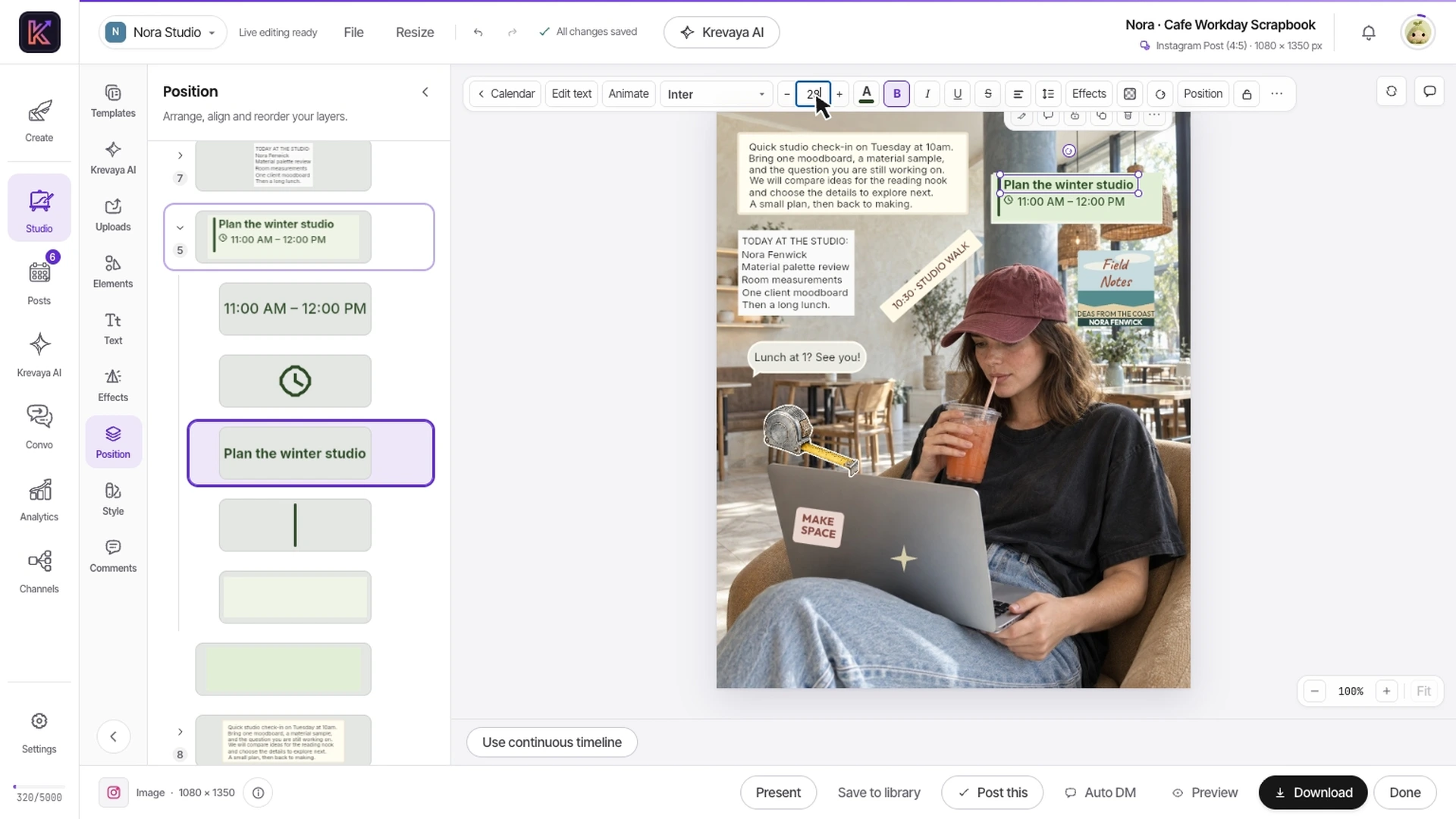
Watch real Studio editing, including text, clip timing, animation, and audio. Evaluate the complete social post alongside the effects and mobile tools your current editor provides.
Recorded in Krevaya Studio: edit the independent text layer in Cafe Workday Scrapbook, then trim footage, animate text, adjust audio, and start a video export in Café Serif Perspective. Original template colors and aspect ratios are preserved. Sample projects; no social post is published. Playback is sped up 1.45×.
Work with clips, text, captions, and music in Studio. Manual timeline and layer edits do not use AI credits; AI assistance and export allowances depend on the plan.
Bring the finished video into Posts, adapt the copy for each supported channel, and check the placement before scheduling it.
Use the same workspace for images, carousels, and written posts. This is useful when the weekly content plan spans several formats.
| Feature | Krevaya | CapCut |
|---|---|---|
| Pricing model | Essentials starts at $19/mo for Studio, Posts, and Convo with AI disabled. Plus adds AI from $29/mo. Processing limits depend on plan | Free editing and paid plans including Pro and Teams. Prices and benefits vary by region, device, and subscription |
| Video editing | Clips, text, music, captions, and MP4 export for everyday social video | A dedicated video editor with effects, keyframes, animation graphs, color controls, and AI tools |
| Where you edit | Studio in your browser, alongside the rest of your social workspace | Native mobile and desktop editors plus an online editor; capabilities vary by platform |
| Captions | Add captions to videos in Studio and write the accompanying social post in Krevaya AI | Automatic speech-to-text captions with text, timing, and style editing across web, desktop, and mobile |
| Images and carousels | An editable social-design and carousel catalog shares your workspace and media library with video | Video templates and creative assets alongside photo and design tools |
| Team and brand workflow | Brand accents, a review queue, client review links, and publishing permissions | Teams subscriptions include a brand kit and shared space; collaboration features depend on plan |
| Publishing workflow | Prepare per-channel copy, review, schedule, and track posts across connected accounts | Video export and platform sharing, including direct YouTube sharing from the desktop editor |
| Long-form work | Long-form video up to 10 hours in 4K is coming soon | A desktop timeline with local-media workflows and tools for YouTube and other longer edits |
Shaded cells indicate the stronger option for that row. Unshaded rows reflect a tie or a difference in approach.
CapCut information was checked against its public pages on 2026-10-21; later checks are dated on the individual rows. Pricing and features can change. Let us know if something needs updating.
This comparison is written by Krevaya. CapCut is not affiliated with Krevaya. The workflow guide was updated on 2026-11-05; competitor facts retain the verification date above.
Choose a short clip you own and list the edits it needs: trim, title, captions, music, aspect ratio, and any essential effects.
Try those edits in Studio. Keep your CapCut source project: an exported MP4 is finished media, not an editable transfer of its timeline, effects, or captions.
Bring the result into a draft, review the destination and caption, and schedule it. Confirm music rights and each channel's format requirements for the actual post.
Check channel support and current plan limits for the workflow you intend to move.
Create your account, choose a plan, and move one real post across before you decide.
Try a plan for 7 days. Card required.
Pick Krevaya when: Video is one part of your content week alongside images, carousels, and written posts. You want to create, review, schedule, and track that mix in one workspace, with Instagram/Facebook conversations in Convo.
Pick CapCut when: Most of your work is editing video, especially on your phone or desktop. You want CapCut's effects, animation controls, automatic captions, and video-focused creative tools.
Krevaya: Essentials starts at $19/mo for Studio, Posts, and Convo with AI disabled. Plus adds AI from $29/mo. Processing limits depend on plan. CapCut: Free editing and paid plans including Pro and Teams. Prices and benefits vary by region, device, and subscription. Verified against CapCut's own published pricing on 2026-10-21.
Video editing: A dedicated video editor with effects, keyframes, animation graphs, color controls, and AI tools. Where you edit: Native mobile and desktop editors plus an online editor; capabilities vary by platform. Long-form work: A desktop timeline with local-media workflows and tools for YouTube and other longer edits.
No. Krevaya does not import CapCut project files as editable Studio timelines. You can upload a compatible exported video and use it as media, or rebuild an edit from source clips you have permission to use.
Studio requires a paid Krevaya plan and runs in the browser. There is no ongoing free plan. CapCut remains a relevant option when free editing, a native mobile workflow, or a particular effect is essential.