
All five paths, explained
Five ways from an idea to the calendar
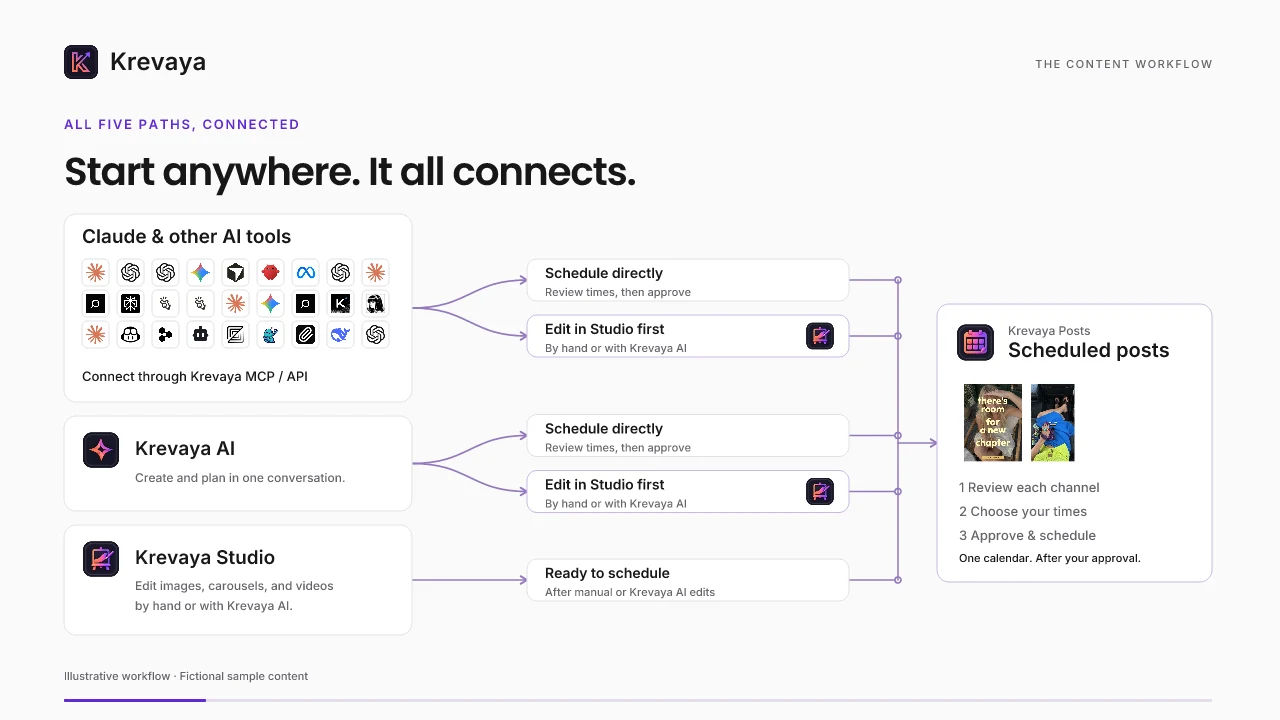
Start in Krevaya AI, or in Claude and other tools through Krevaya MCP or the API. Schedule directly or edit in Studio first, by hand or with Krevaya AI: every route ends on the same calendar, and you approve what goes out.
Read the transcript
Got an idea for a post? Start where you're comfortable. Here's how it comes together in Krevaya.
Connect Claude or another AI through Krevaya MCP or the API. Schedule directly, or edit in Studio first. Krevaya AI offers those same two paths. Or start in Studio, with manual or AI editing. All five paths lead to your calendar.
If it's ready, go straight to scheduling. Ask the assistant, review the channels and times, then confirm.
In Studio, edit images, carousels, or videos by hand. Or ask Krevaya AI to change them. Preview the result, apply it, and keep editing. Then schedule from Posts.
Give each channel its own version. The carousel, photo, or video goes with the caption, on every supported channel.
Every route lands on the same calendar. You decide what gets approved. Krevaya publishes when it's time.
And when someone asks for an outfit link, Convo can send an opening message. Their reply opens the next step. Keep the conversation going.
Create, review, schedule. One idea, a whole workflow, one Krevaya.
Schedule your first post with Krevaya
Create your account, choose a plan, and start making.
Try a plan for 7 days. Card required.