Choose Post Planner if…
Your main job is curating content and maintaining recurring queues. Post Planner's topic buckets, recycling controls, and lower-priced Starter plan suit a small set of social accounts.
Krevaya vs Post Planner
Post Planner helps you find content and keep your publishing queue full. Krevaya connects ideas, original creations, review, publishing, and conversations in one workspace.
Studio from $19/month on Essentials; Krevaya AI from $29/month on Plus. Usage limits apply. Compare plans
Your main job is curating content and maintaining recurring queues. Post Planner's topic buckets, recycling controls, and lower-priced Starter plan suit a small set of social accounts.
You want to turn an idea into original writing and a branded creation, review each channel's post, and manage publishing and Instagram/Facebook conversations together. Plus includes 25 connected accounts.
Evaluate how you make a useful original post, including its media and each channel's copy. Compare that work with the discovery and recycling tools you already use.
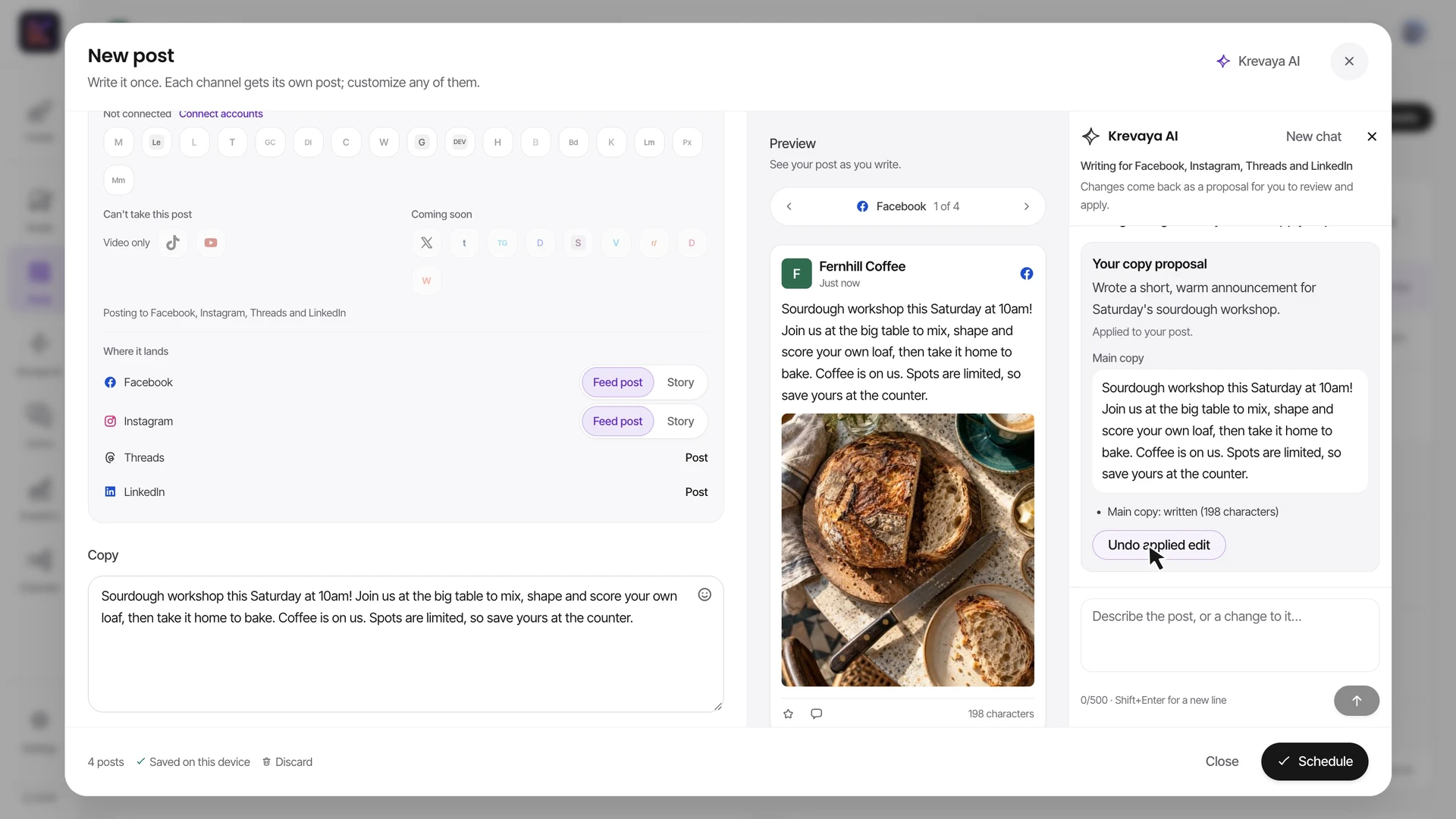
Recorded in the real composer with a fictional café's sample account and media: review AI caption proposals, create channel-specific versions, prepare a carousel, place photos and video, and review the scheduled week. Demonstration data and scripted AI responses; no social post is published. Playback is sped up 1.5×.
Start with a real Studio template or your own media. Change the copy, photos, and layout to suit the post you intend to publish.
Draft in your own words or ask Krevaya AI for help. Review the caption for each channel alongside its preview.
Use the publishing calendar and review flow to decide what goes out next. Evaluate any recurring automation against your actual posting policy.
| Feature | Krevaya | Post Planner |
|---|---|---|
| Paid entry pricing | Essentials: $19/month, 25 accounts, Studio, Posts, and Convo with AI disabled. Plus: $29/month with 2,000 AI credits | Starter: $14 month-to-month or $108/year, with 3 social accounts and 150 queued posts |
| Free plan | No ongoing free plan; 7-day $0 trial for eligible accounts, card required | 1 social account, 10 queued posts, up to 3 posts per day, and a small AI image allowance |
| Finding content | Niche trends and Krevaya Radar help you find angles for original posts | Saved content streams, articles, stock media, and curated content; deeper curation on higher plans |
| Evergreen queues | Calendar, Lineups, and recurring posts on eligible channels. Pinterest and Tumblr posts always need individual approval and do not repeat | Topic buckets, seasonal rotations, queue shuffling, and recycling with an end date or repetition limit |
| AI writing | Ideas and drafts informed by your brand voice, with per-channel copy in the composer; paid-plan credits apply | AI content, captions, and hashtags; the plan table lists these separately from monthly image allowances |
| Visual content | Studio for editable images, carousels, video, and audio, plus AI images and brand-color accents | Stock media, Studio media editing, and AI image generation with plan-based limits |
| Performance | Post and account analytics and best-time scheduling from Essentials; competitor benchmarks from Plus | Post history metrics, engagement comparisons, and one-click re-queueing |
| DM workflows | Convo for Instagram and Facebook: visual flows, lead capture, and team handoff from Essentials; AI answers from Plus | The cited plans focus on publishing, curation, and analytics; a comparable DM flow builder is not documented there |
Shaded cells indicate the stronger option for that row. Unshaded rows reflect a tie or a difference in approach.
Post Planner information was checked against its public pages on 2026-10-21; later checks are dated on the individual rows. Pricing and features can change. Let us know if something needs updating.
This comparison is written by Krevaya. Post Planner is not affiliated with Krevaya. The workflow guide was updated on 2026-11-05; competitor facts retain the verification date above.
Choose a topic your audience needs and gather the photos, clips, and information you have permission to publish.
Make a small set of original posts and review the wording and media for each channel. Check the plan's AI and posting allowances.
Schedule the accepted posts and review the resulting performance. Keep any curation or recycling tool you still need until its replacement is proven.
Check channel support and current plan limits for the workflow you intend to move.
Create your account, choose a plan, and move one real post across before you decide.
Try a plan for 7 days. Card required.
Pick Krevaya when: You want to turn an idea into original writing and a branded creation, review each channel's post, and manage publishing and Instagram/Facebook conversations together. Plus includes 25 connected accounts.
Pick Post Planner when: Your main job is curating content and maintaining recurring queues. Post Planner's topic buckets, recycling controls, and lower-priced Starter plan suit a small set of social accounts.
Krevaya: Essentials: $19/month, 25 accounts, Studio, Posts, and Convo with AI disabled. Plus: $29/month with 2,000 AI credits. Post Planner: Starter: $14 month-to-month or $108/year, with 3 social accounts and 150 queued posts. Verified against Post Planner's own published pricing on 2026-10-21.
Free plan: 1 social account, 10 queued posts, up to 3 posts per day, and a small AI image allowance. Evergreen queues: Topic buckets, seasonal rotations, queue shuffling, and recycling with an end date or repetition limit.
Treat those as separate requirements. Krevaya emphasizes original creation, AI assistance, review, and publishing; its Routines have their own triggers and behavior. Test the exact discovery and recurring-post workflow you need before replacing an existing library or queue.
Krevaya does not provide a one-click Post Planner queue import. Reconnect supported accounts, bring your own copy and media, and recreate the posts you choose to move. Check the old and new calendars to avoid duplicates.