Choose Adobe Premiere if…
You edit demanding video projects that need precise timeline work, professional color and audio controls, transcript-based editing, and collaboration through Frame.io or Team Projects.
Krevaya vs Premiere Pro
Adobe Premiere is a specialist editing and post-production tool. Krevaya brings everyday social video into the same workspace as images, writing, scheduling, and conversations.
Studio from $19/month on Essentials; Krevaya AI from $29/month on Plus. Usage limits apply. Compare plans
You edit demanding video projects that need precise timeline work, professional color and audio controls, transcript-based editing, and collaboration through Frame.io or Team Projects.
Your goal is a steady mix of social videos, images, carousels, and written posts. You want creation, captions, review, scheduling, and post analytics together without building your workflow around a specialist video editor.
Premiere is built for specialist post-production. Krevaya fits a specific job: making everyday social content and moving it into a reviewed publishing plan.
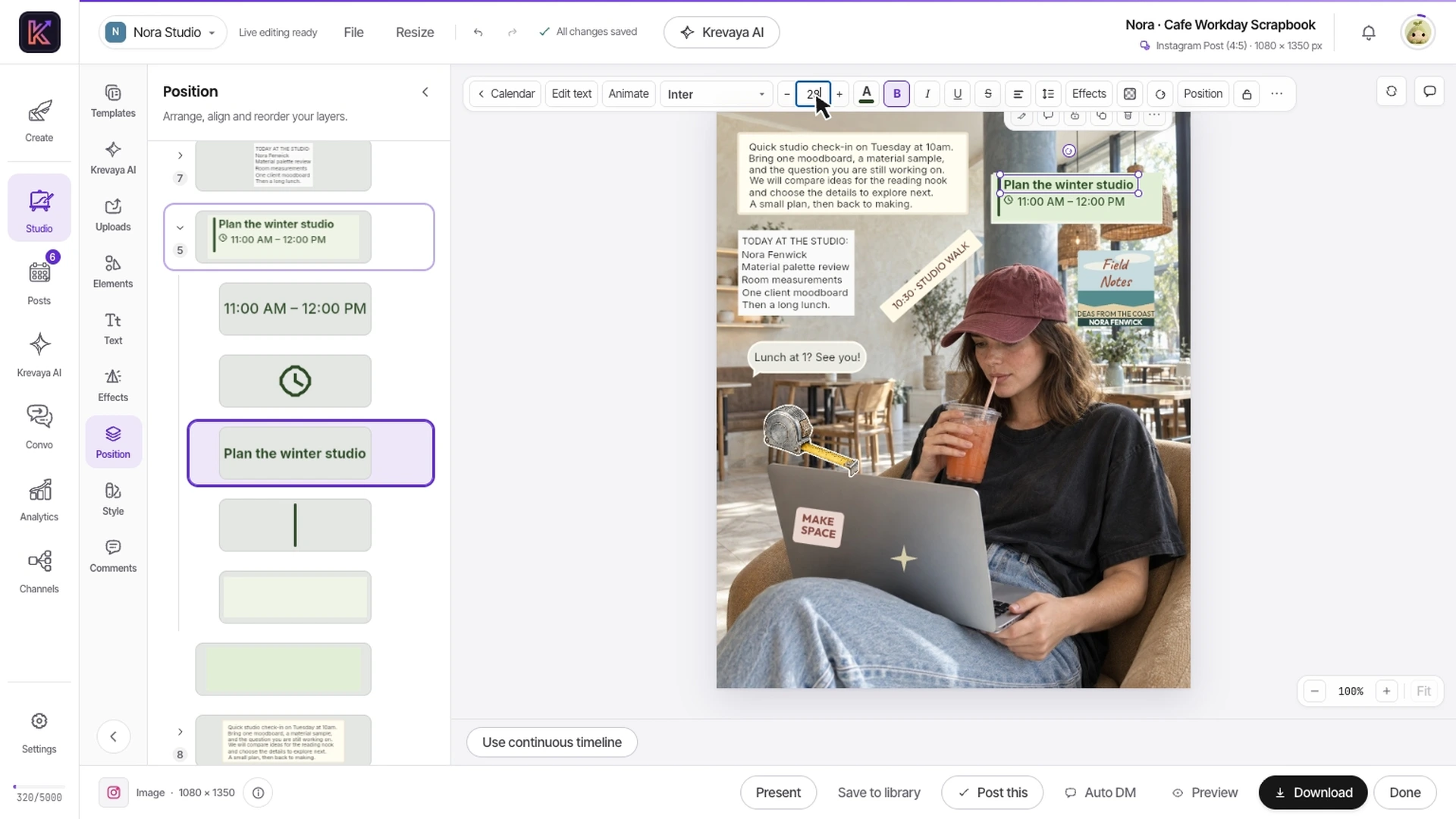
Recorded in Krevaya Studio: edit the independent text layer in Cafe Workday Scrapbook, then trim footage, animate text, adjust audio, and start a video export in Café Serif Perspective. Original template colors and aspect ratios are preserved. Sample projects; no social post is published. Playback is sped up 1.45×.
Trim footage, adjust editable text, work with audio, and export short video from Studio. Check your required editing operations against the demonstration and current product limits.
Write the channel-specific caption, review the preview, and choose a time in Posts. The video becomes one part of a complete publishing workflow.
Professional color, detailed audio finishing, complex timelines, and established Adobe collaboration can justify keeping Premiere. Krevaya can also publish a compatible export from that workflow.
| Feature | Krevaya | Adobe Premiere |
|---|---|---|
| Pricing model | Essentials starts at $19/mo for Studio, Posts, and Convo with AI disabled. Plus adds AI from $29/mo. Plan limits apply | Premiere or a wider Creative Cloud subscription. Compare the billing commitment as well as the monthly figure; included apps vary by plan |
| Editing focus | Social clips, text, music, captions, and MP4 export inside a broader content workspace | Precise timeline editing, Text-Based Editing, and AI-assisted footage search for demanding video projects |
| Color and audio | Video and audio editing for everyday social content in Studio | Professional grading with wheels, curves, and scopes; dialogue enhancement, noise reduction, and audio mixing |
| Titles and captions | Text and captions in your video, plus AI writing for the post that accompanies it | Animated titles, graphics templates, captions, and caption translation |
| Review and teamwork | Review posts, collect client feedback, and control who can approve and publish | Frame.io review and feedback plus Team Projects for collaborative editing |
| Long-form production | Long-form video up to 10 hours in 4K is coming soon | An established desktop workflow for complex edits, camera footage, finishing, and delivery |
| Beyond the video | Images, carousels, AI writing, publishing analytics, and Convo share the same workspace | Premiere focuses on video; eligible subscriptions also include Adobe Express and Frame.io, with more apps in Creative Cloud |
| Social publishing | A calendar, per-channel copy, review, and scheduling for connected accounts | Editing and delivery of finished videos; the cited Premiere pages do not describe an equivalent social publishing calendar |
Shaded cells indicate the stronger option for that row. Unshaded rows reflect a tie or a difference in approach.
Adobe Premiere information was checked against its public pages on 2026-10-21; later checks are dated on the individual rows. Pricing and features can change. Let us know if something needs updating.
This comparison is written by Krevaya. Adobe Premiere is not affiliated with Krevaya. The workflow guide was updated on 2026-11-05; competitor facts retain the verification date above.
Select a short social deliverable and identify the edits, resolution, audio treatment, review steps, and output format it requires.
Build the simple version in Studio or upload a compatible finished export. Keep the Premiere source project; Krevaya does not import .prproj files or preserve their editable timelines.
Compare the complete job through caption approval and scheduling. Keep projects with unmet finishing or long-form requirements in your specialist editor.
Check channel support and current plan limits for the workflow you intend to move.
Create your account, choose a plan, and move one real post across before you decide.
Try a plan for 7 days. Card required.
Pick Krevaya when: Your goal is a steady mix of social videos, images, carousels, and written posts. You want creation, captions, review, scheduling, and post analytics together without building your workflow around a specialist video editor.
Pick Adobe Premiere when: You edit demanding video projects that need precise timeline work, professional color and audio controls, transcript-based editing, and collaboration through Frame.io or Team Projects.
Krevaya: Essentials starts at $19/mo for Studio, Posts, and Convo with AI disabled. Plus adds AI from $29/mo. Plan limits apply. Adobe Premiere: Premiere or a wider Creative Cloud subscription. Compare the billing commitment as well as the monthly figure; included apps vary by plan. Verified against Adobe Premiere's own published pricing on 2026-10-21.
Editing focus: Precise timeline editing, Text-Based Editing, and AI-assisted footage search for demanding video projects. Color and audio: Professional grading with wheels, curves, and scopes; dialogue enhancement, noise reduction, and audio mixing. Long-form production: An established desktop workflow for complex edits, camera footage, finishing, and delivery.
No. Krevaya is an alternative for everyday social video within a broader content workspace. Premiere remains the better fit for demanding timeline work, professional color and audio finishing, and established Adobe production workflows. Krevaya's long-form video and 4K are still listed as coming soon.
Yes. Keep the editable project in Premiere, export a compatible finished video, and use Krevaya for the accompanying copy, review, and scheduling. The uploaded export does not bring the original Premiere timeline or effects into Studio.