Choose Blotato if…
You want the widest platform reach and finished faceless videos out of the box, and you're happy to bring the topic yourself.
Krevaya vs Blotato
The closest comparison on this list: both are AI-first, both assume you want the content made, not just scheduled.
Studio from $19/month on Essentials; Krevaya AI from $29/month on Plus. Usage limits apply. Compare plans
You want the widest platform reach and finished faceless videos out of the box, and you're happy to bring the topic yourself.
You want the topic found for you, the draft written in your voice, and a review step that's on by default rather than opt-in.
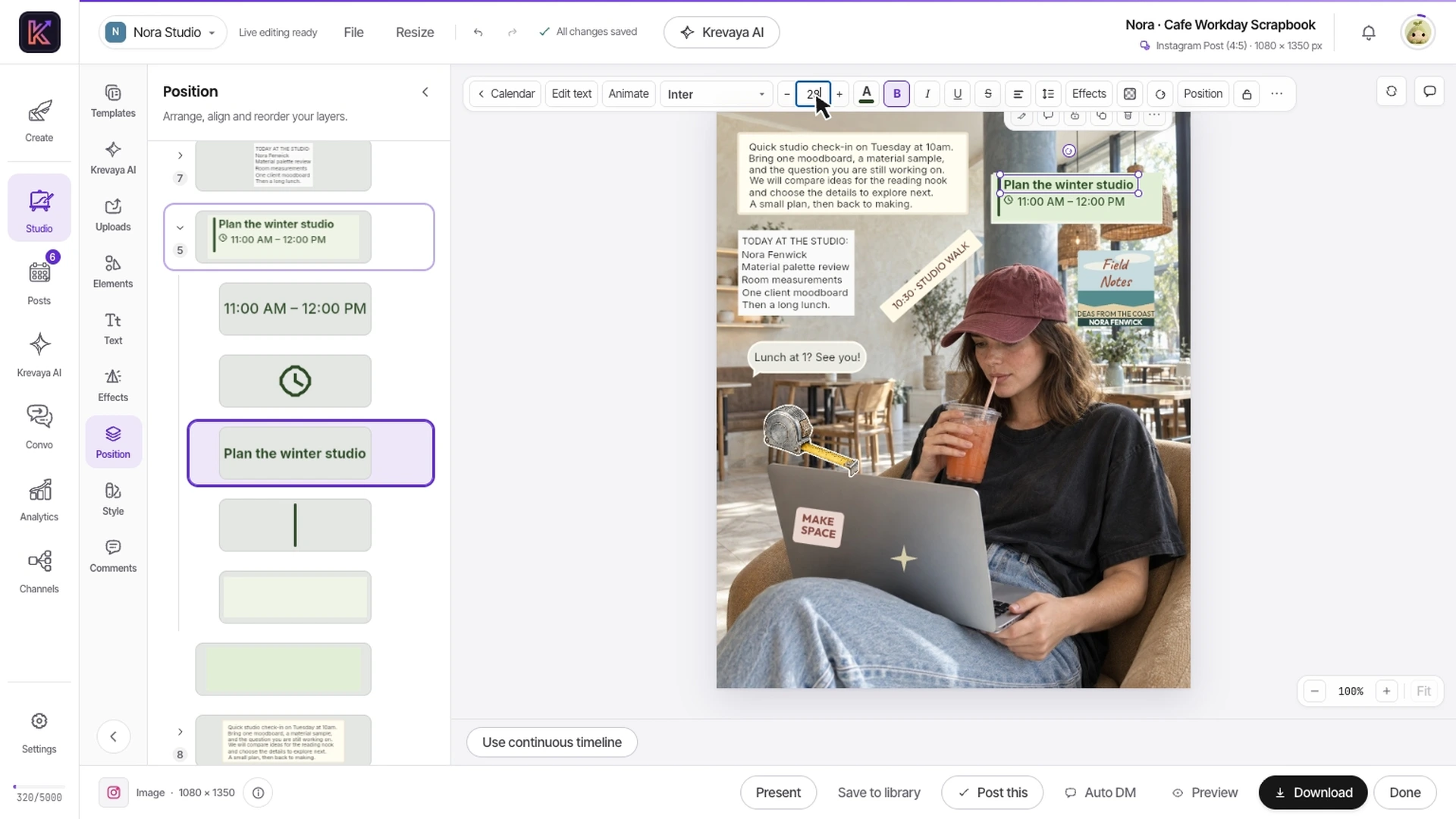
Compare what happens when the generated idea needs one more change. Studio lets you work manually with the text and artwork added as separate objects.
Recorded in Krevaya Studio: edit the independent text layer in Cafe Workday Scrapbook, then trim footage, animate text, adjust audio, and start a video export in Café Serif Perspective. Original template colors and aspect ratios are preserved. Sample projects; no social post is published. Playback is sped up 1.45×.
Change the title, replace a photo, or adjust timing in the saved creation. Manual edits do not use AI credits, so a small correction does not require another generation.
Krevaya AI proposes changes you can preview and apply. Check the copy, creative, and destination before approving the post for publication.
Compare monthly credits, connected accounts, video processing, and the formats you make. Use the same real content brief to evaluate the allowance you need.
| Feature | Krevaya | Blotato |
|---|---|---|
| Entry price | Essentials $19/mo with AI disabled | $29/mo after a 7-day trial; no free plan |
| AI allowance | 2,000 credits/mo on Plus, 7,000 on Pro; AI writing is billed by model use (an AI post is up to about 45 credits; simple posts cost far less) | 1,250 credits/mo on Starter at the same $29 |
| Finding what to post | Ask Krevaya AI what's trending in your niche, then turn a trend into post ideas in one click | Viral template library and inspiration database; you bring the topic |
| Learning from what works | A live corpus of breakout posts from your niche, refreshed continuously: mechanics, never words | AI writer trained on a corpus of 1M+ viral posts |
| Platforms | 34 channels, including Instagram, Facebook, LinkedIn, TikTok, YouTube, Pinterest, X, Threads, Bluesky and Mastodon, plus blogs and newsletters; Reddit in platform review; Discord, Slack, Whop and Vimeo coming soon | 9+ platforms including TikTok, X and YouTube |
| Short-form video | Video in Krevaya Studio on every paid plan, from Essentials: clips, text and music in one editor, exported to MP4 with no AI credits, up to your plan's monthly export minutes | Renders finished faceless videos for you |
| Control over what ships | Review-first by default: nothing publishes without approval; auto-publish is opt-in per brand | Drag-and-drop calendar and scheduling |
| Competitor monitoring | Krevaya Radar with breakout alerts and a competitor.breakout webhook | Not advertised |
| Connected accounts | 25 on Essentials ($19) · 25 on Plus ($29) · 100 on Pro ($99) | 20 on Starter ($29) · 40 on Creator ($97) |
| API & automation | REST, GraphQL (beta), a hosted MCP server and HMAC-signed webhooks, from Plus up | API and MCP for AI agents (n8n, Make, Claude); API excluded from the trial |
Shaded cells indicate the stronger option for that row. Unshaded rows reflect a tie or a difference in approach.
Blotato information was checked against its public pages on 2026-08-17; later checks are dated on the individual rows. Pricing and features can change. Let us know if something needs updating.
This comparison is written by Krevaya. Blotato is not affiliated with Krevaya. The workflow guide was updated on 2026-11-05; competitor facts retain the verification date above.
Use a short brief you already need to publish, with your own approved copy, media, and brand details.
Make one image or video and then request a realistic correction. Check which parts remain editable and which AI actions consume credits.
Review the channel versions and schedule the accepted result. Compare the total work and usage for the finished post.
Check channel support and current plan limits for the workflow you intend to move.
Create your account, choose a plan, and move one real post across before you decide.
Try a plan for 7 days. Card required.
Pick Krevaya when: You want the topic found for you, the draft written in your voice, and a review step that's on by default rather than opt-in.
Pick Blotato when: You want the widest platform reach and finished faceless videos out of the box, and you're happy to bring the topic yourself.
Krevaya: Essentials $19/mo with AI disabled. Blotato: $29/mo after a 7-day trial; no free plan. Verified against Blotato's own published pricing on 2026-08-17.
AI allowance: 1,250 credits/mo on Starter at the same $29. Short-form video: Renders finished faceless videos for you.
No. An uploaded or generated image remains an image layer. Independent editing applies to text, photos, shapes, and other objects added as separate layers in a Studio creation. Words already baked into an image do not automatically become text layers.
You can upload compatible exported images and videos that you have permission to use. An exported file does not transfer the originating project's editable structure, publishing queue, or connected-account authorizations.