The best time to post on social media: find your own useful windows
Find posting times for your audience using a practical experiment, comparable metrics, timezone checks, and a free tracker. Includes a worked data example.

The short answer
There is no single best time to post on social media for every account. Start with plausible windows for your audience, then compare similar posts published at different times using the same measurement period. Treat early results as directional, account for timezone and format, and keep the windows that produce useful outcomes for your audience and business.
What to take away
- Use general timing advice as a hypothesis, then test your own account.
- Compare similar posts and the same measurement window; timing is only one variable.
- Choose a schedule you can maintain and support with timely human responses.
Why a universal best posting time is the wrong target
A local service business, a developer tool, and an international creator do not share one audience schedule. Even within one account, a short discussion prompt and a detailed tutorial can perform differently. A single best-hour chart compresses those differences into a number that may not describe your situation.
General recommendations can still supply a starting hypothesis. The mistake is treating them as a rule that overrides your own evidence. Your objective is a useful, repeatable posting window for a particular audience and format, with enough flexibility to keep improving the content itself.
This guide provides an experiment you can run. It does not claim to have analyzed Krevaya customer data or discovered a platform-wide best time. The numbers below are illustrative so you can see how to interpret a result without confusing it with a benchmark.
Choose the outcome before choosing the time
A post can receive reactions without generating the result you need. Decide whether this batch is meant to teach, start a relevant conversation, attract visits, or invite inquiries. Select one primary measure and a small number of supporting measures before the experiment starts.
| Post purpose | Possible primary measure | Useful context |
|---|---|---|
| Teach a practical process | Saves or relevant responses, where available | Reach and the questions readers ask |
| Start a discussion | Substantive replies | Whether the respondents fit the audience |
| Send readers to a guide | Link clicks or attributable site visits | Landing-page engagement and next steps |
| Explain an offer | Qualified inquiries or another defined action | Visits, questions, and offer relevance |
Keep metric definitions consistent. If you calculate engagement rate, state both the numerator and denominator. For example, selected interactions divided by impressions is different from selected interactions divided by reach. Do not combine the two in one comparison just because both are labeled engagement rate.
Platforms and tools expose different metrics, and missing data is not zero. Mark an unavailable value as unavailable. A cross-platform comparison needs extra care because similarly named metrics may not describe identical events.
Build a baseline from comparable posts
Collect recent posts from the account you want to improve. Include publication time and timezone, topic, format, whether distribution was paid or organic, and the metrics you can measure consistently. A baseline helps you see whether a proposed window is actually new or already part of your routine.
- Separate paid distribution from organic posts. A boosted post can distort an organic timing comparison.
- Compare related formats and purposes. Do not compare a major launch video with a routine text tip and attribute the whole difference to time.
- Record the measurement interval. A seven-day-old post has had more opportunity to accumulate results than one published yesterday.
- Flag unusual events. A product launch, major mention, holiday, or exceptional news event may make a post less representative.
- Keep outliers visible. Inspect unusually strong or weak results instead of silently deleting them to make the pattern cleaner.
If your historical reporting does not preserve metrics at a consistent post age, use it to form hypotheses rather than presenting it as a clean test. Begin a forward-looking tracker and measure the new posts at the same age.
Run a simple two-window timing experiment
Choose two plausible windows based on your audience's routine or the activity information available in your account. For example, a business audience might justify testing a morning window against a midday window. Those are hypotheses, not recommended winning times.
- Define the scope. Use one account, one general content format, and one primary outcome. Record the timezone explicitly.
- Choose two windows. Label them A and B so the worksheet does not accidentally imply that one is preferred.
- Rotate comparable posts. Distribute similar topics and formats across both windows. Where practical, randomize the assignment so your strongest ideas do not all land in A.
- Use one observation interval. For example, record every post's metrics 48 hours after publication. Choose the interval before the test and keep it consistent.
- Run several cycles. A four-week experiment can organize the work, but it is not a guarantee of sufficient data. Low posting volume or variable results may require a longer test.
- Compare the pattern. Review the median result, the range, and any contextual differences. Continue testing if one unusual post explains most of the gap.
A worked example: interpret a promising result carefully
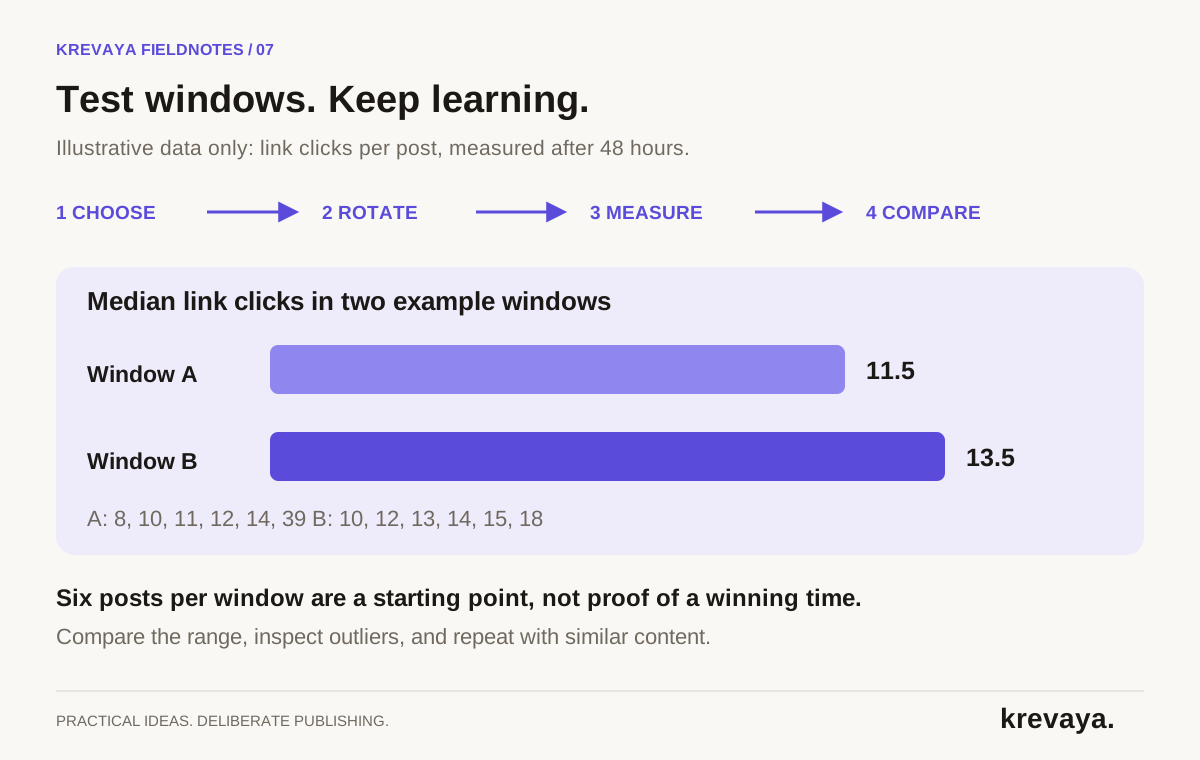
Suppose you compare six guide posts in each window and record link clicks after the same 48-hour interval. The following data is invented to demonstrate the calculation; it is not a Krevaya performance claim.
| Window | Six observations | Median | Range |
|---|---|---|---|
| A | 8, 10, 11, 12, 14, 39 | 11.5 | 8–39 |
| B | 10, 12, 13, 14, 15, 18 | 13.5 | 10–18 |
For six observations, the median is the average of the third and fourth values after sorting. Window A has a median of 11.5; window B has a median of 13.5. The arithmetic mean favors A because of the post with thirty-nine clicks, while the median favors B. Looking at both reveals why one summary number is not enough.
The useful next question is what happened on the unusually strong A post. Did it cover a more urgent question, receive an external mention, or have a stronger opening? You should inspect that context before interpreting the result as a timing effect.
Window B looks worth testing again in this example. It does not prove B is the best time for the account, let alone for everyone on the platform. With only six posts per group and overlapping outcomes, keep the conclusion modest and collect more evidence.
Handle timezones and availability explicitly
Record the scheduling timezone in a named form such as America/Chicago rather than leaving a bare time like 9:00. Named timezones describe daylight-saving behavior more clearly than a fixed UTC offset alone. When clocks change, inspect upcoming scheduled posts and confirm the displayed local time.
If your audience spans regions, decide which audience the post is intended to serve. You may need more than one useful window. Do not average distant regions into a time that suits neither group, and do not publish duplicate posts repeatedly just to cover every hour.
Your availability also matters. A post designed to start a conversation benefits from having someone available to read and respond. If two windows perform similarly, the one your team can support may be the better operating choice.
Keep this decision visible in the content calendar. A selected time should have a reason, a timezone, and an owner rather than becoming an unexplained recurring slot.
What if your account has very little data?
Start with a small number of plausible windows and focus on learning which topics earn useful responses. A few posts cannot support precise timing claims. Consistent production and a clear audience question give you better inputs for a later timing experiment.
Record the same fields from the beginning, even if the numbers are small. You are building a usable history. Avoid changing the topic strategy, visual format, posting frequency, and timing all at once; if the results shift, you will have little basis for deciding why.
A practical early goal is simply to complete the workflow reliably: publish the intended version, confirm delivery, and learn from the response. Use the automation guide to make that routine manageable.
Use scheduling suggestions as a starting point for judgment
Krevaya's Calendar & Scheduling includes timezone-aware slots and best-time suggestions computed from your account's engagement history. Its analytics features help bring results back into planning. Suggestions become more useful when the underlying history is relevant to the content you are planning.
The free best-time tool is another planning starting point. Inspect the basis of any suggestion and compare it with your own account data; a general tool and an account-history recommendation are different kinds of evidence.
Revisit selected windows when your audience, content mix, or business priorities change. Keep the schedule that serves the work today, and keep enough room in the calendar to learn something new.
Frequently asked questions
What is the best time to post on social media?
There is no universal time that is best for every account. Choose plausible windows for your audience, compare similar posts using a consistent measurement interval, and repeat the test. Treat general charts as starting hypotheses rather than rules.
How long should I test posting times?
Long enough to observe several comparable posts in each window and understand the variability. A four-week plan can organize the experiment, but low posting volume or inconsistent results may require longer. A calendar duration alone does not establish statistical confidence.
Should I use engagement rate or clicks to choose posting times?
Choose the measure that matches the post's job. Clicks or site visits may fit a guide promotion; relevant replies may fit a discussion. If you use engagement rate, keep the interaction definition and denominator consistent across the posts you compare.
Can Krevaya suggest posting times for my account?
Krevaya's Calendar & Scheduling feature describes best-time suggestions based on your account's engagement history. Treat them as evidence to consider alongside format, audience context, and your own experiment. No timing suggestion guarantees reach or engagement.
Sources & editorial details
Product and source pages checked September 20, 2026. Practical templates and worked examples are editorial guidance, not measured customer results.
Created with AI assistance and published by Krevaya AI. Send corrections to support@krevaya.com.