How to repurpose a blog post into social media content
Turn one blog post into distinct social posts with a source-first workflow, platform examples, a reusable AI brief, and a free content repurposing worksheet.

The short answer
To repurpose a blog post for social media, extract its useful ideas and supporting evidence, choose one takeaway for each new post, and adapt the structure to the destination platform. Review every version against the source. A strong repurposed post delivers value on its own while giving interested readers a clear reason to explore the full article.
What to take away
- Extract distinct ideas instead of repeatedly shortening the introduction.
- Preserve the source's caveats, dates, and evidence when changing the format.
- Treat every platform version as its own draft, visual, and approval decision.
Start with a blog post that deserves a second life
A long article is not automatically good repurposing material. Choose one with a clear audience, a useful argument, and details you can support. Tutorials, decision guides, original observations, and answers to recurring customer questions usually provide more distinct angles than a general company announcement.
Before generating anything, read the source as an editor. Check dates, product availability, examples, links, and claims. Remove or update anything you would not publish today. If the article quotes someone else, keep the attribution attached to the idea. Use only material and visuals you have permission to reuse.
- Audience fit: The topic answers a question your social audience actually has.
- Useful substance: The source contains a process, example, checklist, distinction, or defensible point of view.
- Freshness: Prices, screenshots, product behavior, and time-sensitive statements still hold.
- A next step: The full article offers depth beyond what fits in an individual social post.
For the worked example below, imagine an article titled What to include in a website project brief. Its useful content is a list of six inputs: business goal, audience, required pages, available assets, budget range, and deadline. This is a fictional teaching example, not a customer case study.
Build a source map before writing new posts
A source map separates the ideas in the article from the wording that happened to carry them. Give each idea an evidence note and a boundary. This makes it easier to create new formats without stretching the original claim.
| Source idea | What the post can explain | Boundary to preserve |
|---|---|---|
| A business goal guides the project | Why a desired outcome is more useful than a mood board alone | Do not promise a specific conversion improvement |
| Existing assets affect preparation | A checklist of photos, copy, brand files, and access details | Do not imply every project needs the same files |
| A deadline needs context | Why a launch event or dependency should be named | Do not promise a turnaround time the studio has not approved |
| A budget range helps define scope | How scope and budget can be discussed early | Do not invent prices or say all studios price alike |
The boundary column is especially valuable for AI-assisted repurposing. A model can make a sentence sound more compelling by making it more absolute. Keep may, can, and in this example when those words carry an important limitation.
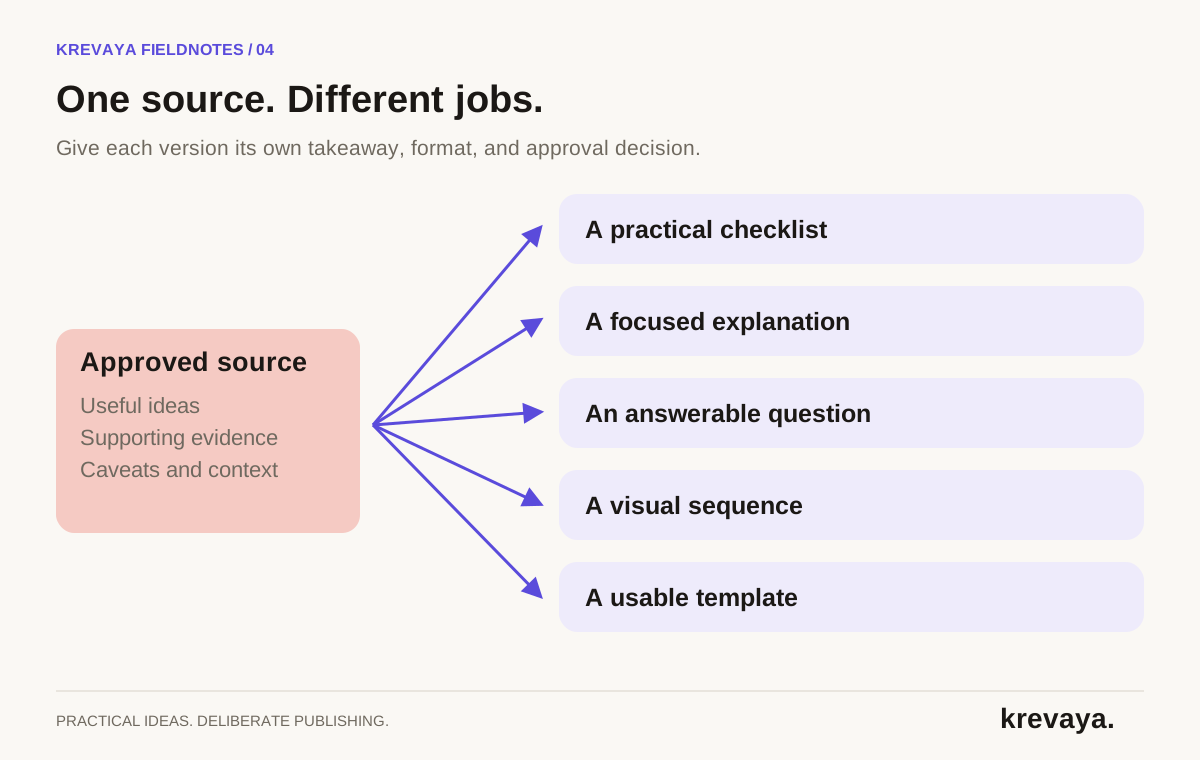
Turn the source into five genuinely different posts
| Angle | Opening idea | Reader value |
|---|---|---|
| Checklist | Before your first website call, gather these six inputs | A useful preparation list |
| Explanation | A mood board shows taste. A project goal explains what the site must do | A decision-making distinction |
| Question | Which part of a website brief is hardest to answer? | An invitation to discuss a real problem |
| Visual sequence | From a vague brief to a useful one, one field at a time | A concrete before-and-after demonstration |
| Template | Use this sentence to describe the goal of your next website project | A small resource the reader can apply immediately |
Five is an example, not a quota. If the source supports only two strong posts, publish two. Repeating the same takeaway with a new first line can fill a calendar while teaching the audience nothing new.
A practical test is to summarize each draft in one sentence without looking at its hook. If all five summaries are the same, return to the source map and choose more distinct jobs.
Adapt the idea to the platform, not just the character count
A platform version should feel complete in the place where people encounter it. A text post needs a clear argument. A carousel needs a readable sequence. A short conversation starter needs a question people can answer without opening another page.
A useful website brief starts with a business goal.

Compare these two starting points:

1. We want a modern website.
2. We want prospective clients to understand our service and request a project call.

The second gives the team something to organize around: the pages, examples, and next step all have a job.

Before collecting visual references, write one sentence about what the site should help a visitor do. Our full project-brief guide covers the other inputs to prepare.
Slide 1: Before your first website project call
Slide 2: Name the business goal
Slide 3: Describe the audience
Slide 4: List required pages and existing assets
Slide 5: Explain budget context and the real deadline
Slide 6: Save this as your preparation checklist

Caption: Add context the slides do not cover. Use a real, available path to the full guide; do not assume the caption link is the right route.
A website brief can be one page and still be useful. The hardest part is often writing the goal without using words like modern or professional.

What should a visitor understand or do after seeing your site? Start there.
These are illustrative drafts, not ready-to-publish promises for your business. Replace the example and the full-guide reference with material you actually have. Check the current platform limits and preview the final version. Krevaya's character counter can help during preparation.
Give AI a brief that protects the meaning of the source
Asking for ten viral posts encourages volume and exaggeration. Ask for a small set of distinct takeaways, require a source reference for each claim, and make uncertain details visible to the reviewer.
Source material: [paste approved text]
Audience: [who this helps]
Goal: [one useful action or understanding]
Voice examples: [your own approved writing]

First list the distinct ideas supported by the source.
Choose three that answer different audience questions.
For each idea, draft the requested platform version.
Preserve caveats, dates, and attribution.
Do not invent statistics, customers, experience, prices, or product features.
If the source does not support a detail, flag it for review instead of filling it in.
Give each draft a proposed visual and a relevant next step.
Return drafts for human review; do not publish.
Use your brand-voice brief alongside the source. Voice guidance can change the rhythm and vocabulary; it must not change the truth conditions of a claim. A more confident tone should never become a more certain factual statement.
Review, schedule, and connect the versions
- Check the source match. Can you point to support for every specific claim? Does the shorter version preserve the original qualification?
- Review the complete visual. Check text size, crop, sequence, attribution, and whether a conceptual illustration could be mistaken for a real result.
- Check the destination. Confirm the right account, format, working link, and relevant landing page. Avoid a call to action that sends readers somewhere unrelated.
- Space the ideas thoughtfully. Add them to the calendar where each answers a useful question. Mix in other topics and audience responses rather than running near-duplicates consecutively.
- Record the source and outcome. Keep the original article URL alongside each published version so you can refresh related posts when facts change.
Use the 30-day content calendar to place your variants, and the approval guide to define the final check.
Measure which ideas travel well
Compare the versions by the job they were meant to do. A checklist can be useful even if it attracts fewer clicks than a guide preview. A question can reveal language your audience uses even if it reaches fewer people. Record saves, relevant replies, visits, or inquiries where those measures are available and appropriate.
For a link that leads to your website, use consistent campaign parameters and distinguish each version with a content label. Google's campaign URL documentation explains the parameters. Compare like-for-like measurement windows so an older post does not win merely because it has had more time.
Krevaya's Repurpose Engine accepts a URL, pasted text, or a PDF and turns the source into drafts through its voice-informed pipeline. Review the extracted substance, edit each version, and approve the posts that fit. The original thinking remains the foundation; AI helps carry it into another format.
Frequently asked questions
How many social posts can I make from one blog article?
Use as many distinct posts as the source can support usefully. A strong tutorial may yield a checklist, explanation, example, question, and template. A short announcement may support only one or two. Do not force a quota by repeating the same takeaway.
Is repurposing the same as cross-posting?
Cross-posting distributes content to several destinations. Repurposing adapts an idea into a different structure or format for a specific audience and context. You can distribute repurposed versions across channels, but each should be reviewed as its own post.
Can AI turn a blog post into social media content?
Yes. AI can identify angles and produce first drafts from an article. It still needs accurate source material, voice guidance, and human review. Check that it has not invented results or dropped a caveat while shortening the text.
Should every repurposed post link to the original article?
Not necessarily. Each post should provide value on its own. Link when the article is a useful next step and the platform supports an appropriate link path. Keep the source recorded internally even when the public post does not include a link.
Sources & editorial details
Product and source pages checked September 20, 2026. Practical templates and worked examples are editorial guidance, not measured customer results.
- Krevaya: Repurpose Engine inputs and workflow
- Krevaya: AI writing and voice modeling
- Google Analytics: campaign URL parameters
Created with AI assistance and published by Krevaya AI. Send corrections to support@krevaya.com.