A social media approval workflow that keeps posts moving
Create a clear social media approval process with owners, review states, deadlines, exception handling, and a free pre-publish checklist for small teams.

The short answer
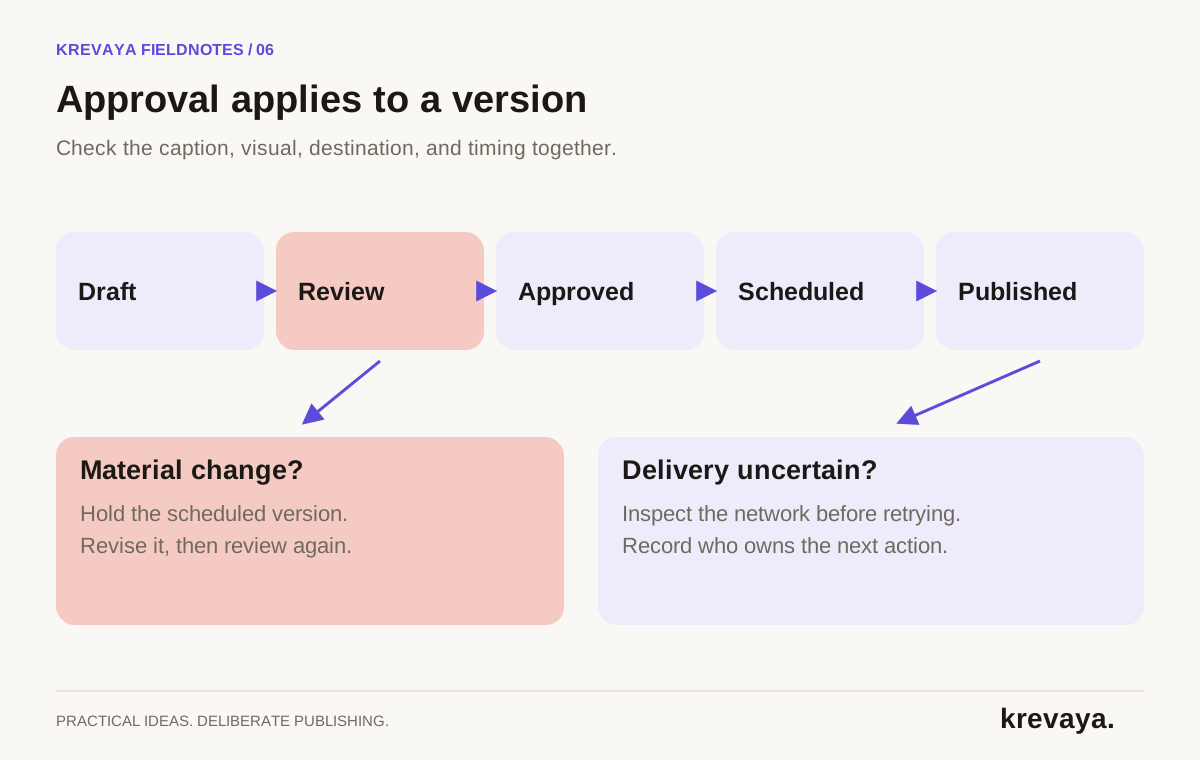
A social media approval workflow defines who prepares a post, who checks the final version, and what must happen before it can be published. Use clear states, one accountable approver, and a review deadline before the publishing slot. Review the caption, visual, destination, and timing together, and send materially changed content back for approval.
What to take away
- Approval applies to a specific final version on a specific account.
- A missed review deadline should hold or move a post, not silently approve it.
- Keep a clear path for edits, failed delivery, and changes after scheduling.
What does approved actually mean?
A message that says looks good is ambiguous if the caption is in one document, the image is in another, and the scheduled account is somewhere else. A useful approval decision applies to the complete post: wording, media, links, destination, and time. That version is the thing the audience will see.
For a solo creator, the author and approver can be the same person. The value comes from separating drafting from the final check, even if only a short break separates them. For a small team, name one accountable approver so two people do not each assume the other has checked the facts.
An AI-generated draft needs the same standard as any other draft. Fluent wording can hide an invented statistic or a product capability that does not exist. A confidence score or a familiar tone is not an editorial sign-off.
Assign the smallest set of roles that covers the work
| Role | Owns | Typical handoff |
|---|---|---|
| Content owner | The brief, source, draft, and requested edits | Submits one complete version for review |
| Approver | Accuracy, brand fit, destination, and the final decision | Approves, requests specific changes, or rejects |
| Publishing owner | Schedule, connection health, and delivery checks | Confirms the published result or resolves an exception |
| Subject expert, when needed | A claim or detail requiring specific knowledge | Checks the relevant statement before final approval |
One person can hold several roles. These are recommended operational responsibilities, not a claim that every tool provides matching permission levels. If separate client approval or restricted publishing access is a requirement, test that permission model before adopting the software.
Avoid making everybody a required reviewer for every post. Ask the relevant expert to check the relevant claim, then let the accountable approver decide. An ordinary educational post should not inherit the same handoff complexity as a major announcement unless the content requires it.
Use clear states and define what moves a post forward
| State | Meaning | Exit condition |
|---|---|---|
| Draft | Content is still being prepared | Caption, visual, source, and destination are complete |
| In review | The final version is waiting for a decision | Approver accepts it or requests changes |
| Changes requested | Specific corrections are needed | Owner submits a corrected version |
| Approved | The checked version may be scheduled | Publishing owner confirms the slot |
| Scheduled | The post is queued for a future time | Delivery is confirmed or an exception appears |
| Published | The network has the intended post | Published URL and result are recorded |
| Held | A fact, connection, or delivery issue needs attention | Owner resolves the issue and repeats relevant checks |
Tools may name or implement these states differently. The important part is that the team can tell which decision is still missing. Approved and published are not synonyms. Scheduled and guaranteed to publish are not synonyms either.
The pre-publish checklist: seven questions to answer
- Is the claim supported? Check numbers, product behavior, names, dates, and any promised result against an approved source. Label hypothetical examples clearly.
- Does it sound like the business? Read the opening and call to action aloud. Remove generic filler and language that overstates the source. Use the brand-voice rubric for repeatable feedback.
- Is the visual complete and usable? Check readability on a phone, the crop, slide order, caption alignment, and text alternatives where supported. Confirm you can use the image.
- Does the destination match the intent? Verify the correct brand, account, and platform-specific version. Check that a link leads to the promised resource.
- Are offer details still current? Confirm availability, deadline, scope, and any qualification the reader needs to understand the offer.
- Is the timing right? Confirm date and timezone. Ask whether current events or a product change make a previously appropriate post need another look.
- Is there a clear owner after publishing? Someone should verify delivery, watch for relevant responses, and know how to correct or hold follow-up content.
Set deadlines and write feedback that can be acted on
Put the review deadline before the publication slot, with enough room for a correction. The exact lead time depends on your content. A simple evergreen explanation may need a short turnaround; a launch with several dependencies needs longer. Decide the expectation with the people doing the work.
If review does not happen in time, move or hold the post. Silence should not become approval. Record a backup approver only if that person has the context and authority to make the decision.
| Unclear feedback | Actionable feedback |
|---|---|
| Make it better | Lead with the customer question, then explain the three steps |
| Too salesy | Remove the unsupported growth promise and link to the feature explanation |
| Wrong image | Use the final product image and keep the label visible in the mobile crop |
| Not our voice | Replace the superlative with the concrete behavior and shorten the opening |
Consolidate feedback on one version. If the team edits several copies, choose the authoritative version before scheduling. A reviewer should not have to guess whether their requested correction made it into the post that will publish.
Handle changed facts and failed publishing deliberately
Imagine an approved post promoting an offer that becomes unavailable. The publishing owner holds the scheduled version, the content owner updates the wording and destination, and the approver checks the revised offer. This is an operational pattern you should define even if the tool does not enforce every step automatically.
Now imagine a timeout during publication. The status is unclear, so someone needs to inspect the network before retrying. Repeatedly clicking publish can turn one uncertain delivery into duplicate posts. Record what was checked, then retry only after the outcome is understood.
- Changed fact: Hold affected content, update the source, revise the draft, and approve the new version.
- Disconnected account: Reconnect through the supported flow, inspect the scheduled queue, and verify delivery after the next attempt.
- Wrong live post: Assess the specific error, correct or remove it where appropriate, and inspect related scheduled versions.
- Sudden context change: Pause the relevant batch and decide which posts still make sense before resuming.
Keep the exception procedure short enough that someone can use it under pressure. Knowing where the queue is and who owns the next action is more valuable than a long document nobody can find.
Measure review quality without rewarding rushed approvals
Track how long posts wait for review, how often they return for changes, and what the recurring correction is. A long wait may point to unclear ownership. Many factual corrections may point to weak sources. Repeated tone corrections may point to a poor voice brief.
Do not optimize solely for approval speed. A reviewer who catches a wrong price is doing useful work. Pair turnaround time with the number and nature of corrections, and check whether the upstream briefs improve over time.
Krevaya's Review-First Publishing provides approve, edit, and reject actions. Generated posts wait for approval by default; auto-publish is opt-in per pipeline. Its publishing workflow treats network versions separately so you can approve the ones that fit. Use the operational checklist here alongside the product's actual controls.
For the broader workflow, read the social media automation guide. To make deadlines visible before drafts pile up, use the content calendar template.
Frequently asked questions
Who should approve social media posts?
Name one accountable approver who understands the brand and the claims being made. A solo creator can approve their own work after a separate review pass. Bring in a subject expert when a specific claim needs their knowledge, but keep the final decision owner clear.
Should an edited social media post be approved again?
Yes when the edit changes the claim, meaning, offer, visual, destination, or other material detail. Approval applies to the version that was reviewed. Check whether your software resets approval automatically; if it does not, hold the post and repeat the relevant review manually.
How can a small team speed up content approval?
Submit a complete version with its source, visual, destination, and deadline. Assign one final approver, consolidate feedback, and use a short checklist. Fix repeated problems in the brief so the reviewer does not make the same corrections in every batch.
Does Krevaya publish AI drafts without approval?
Generated drafts wait for approval by default. Krevaya lets users explicitly enable auto-publish per pipeline. Keep review enabled for any workflow that still needs checking, and choose automation settings based on the actual quality and sensitivity of its content.
Sources & editorial details
Product and source pages checked September 20, 2026. Practical templates and worked examples are editorial guidance, not measured customer results.
- Krevaya: approval defaults and auto-publish controls
- Krevaya: per-network publishing
- Krevaya: product principles
Created with AI assistance and published by Krevaya AI. Send corrections to support@krevaya.com.