Choose content pillars from the questions customers actually ask
Choose a few content pillars from customer questions, test them against your expertise, and turn each into useful posts with a bike-shop example and worksheet.
The short answer
Choose content pillars by grouping recurring customer questions around the decisions people need to make. Keep the groups you can answer with reliable business knowledge, give each a clear name, and identify a useful first post. Start with fewer pillars rather than filling arbitrary categories, then adjust them as new questions reveal gaps or overlap.
What to take away
- Group questions by the customer's task, such as choosing, maintaining, or preparing, rather than by post format.
- Keep a pillar only when you can verify its answers and identify a useful first post with a clear next action.
- Use a question-level brief for drafting, then revise the pillars when new inquiries reveal overlap, gaps, or missing facts.
Which customer questions should you collect?
Start where customers already ask for help: sales conversations, emails, comments, service appointments, and questions staff hear at the counter. Write down the question before turning it into a content idea. That preserves the customer's language and keeps your planning tied to an actual need.
Record enough context to distinguish similar questions. Someone buying their first bike needs a different explanation from an experienced rider replacing a worn component, even if both ask what to buy.
For each question, note:
- Who asked, described by their situation rather than their identity.
- What they were trying to decide or do.
- Whether the question has come up repeatedly or is an isolated request.
- Where you can check the answer, such as a current service page, product information, or a knowledgeable teammate.
Remove names, contact details, and private circumstances before sharing the notes with a writer or AI tool. You need the useful question, not the customer's personal information.
Don't have a question history yet? Ask the person handling inquiries what people need explained before they buy or visit. Mark staff guesses separately from questions customers have actually asked. A guess can inspire a post, but it shouldn't masquerade as evidence of demand.
How do you turn questions into a few pillars?
Group questions by the task they help the customer complete. Don't start with formats such as videos, testimonials, or tips. Those describe how you might publish, not what your audience needs to understand.
Use this sequence:
- Sort by customer intent. Put questions about choosing together, preparation questions together, and ongoing-use questions together.
- Name the shared subject. Use plain labels that suggest future questions, not broad words such as engagement or inspiration.
- Check your ability to answer. Keep a group only if you have relevant knowledge and a way to verify the details.
- Find a useful first post. If you can't identify an answer worth publishing, the group may be too vague or premature.
- Check for overlap. Merge groups that would repeatedly produce the same answers. Split a group when it serves genuinely different decisions.
The tradeoff is coverage versus workload. More pillars can represent more parts of the business, but each creates another promise to prepare useful material. Fewer pillars make planning easier, but an overly broad category can hide important differences between customers.
Keep a small set you can support now. You don't need a separate pillar for every product, promotion, or occasional question. A launch can sit within an existing subject if it helps someone make the same kind of decision.
What does the bike-shop sorting board look like?
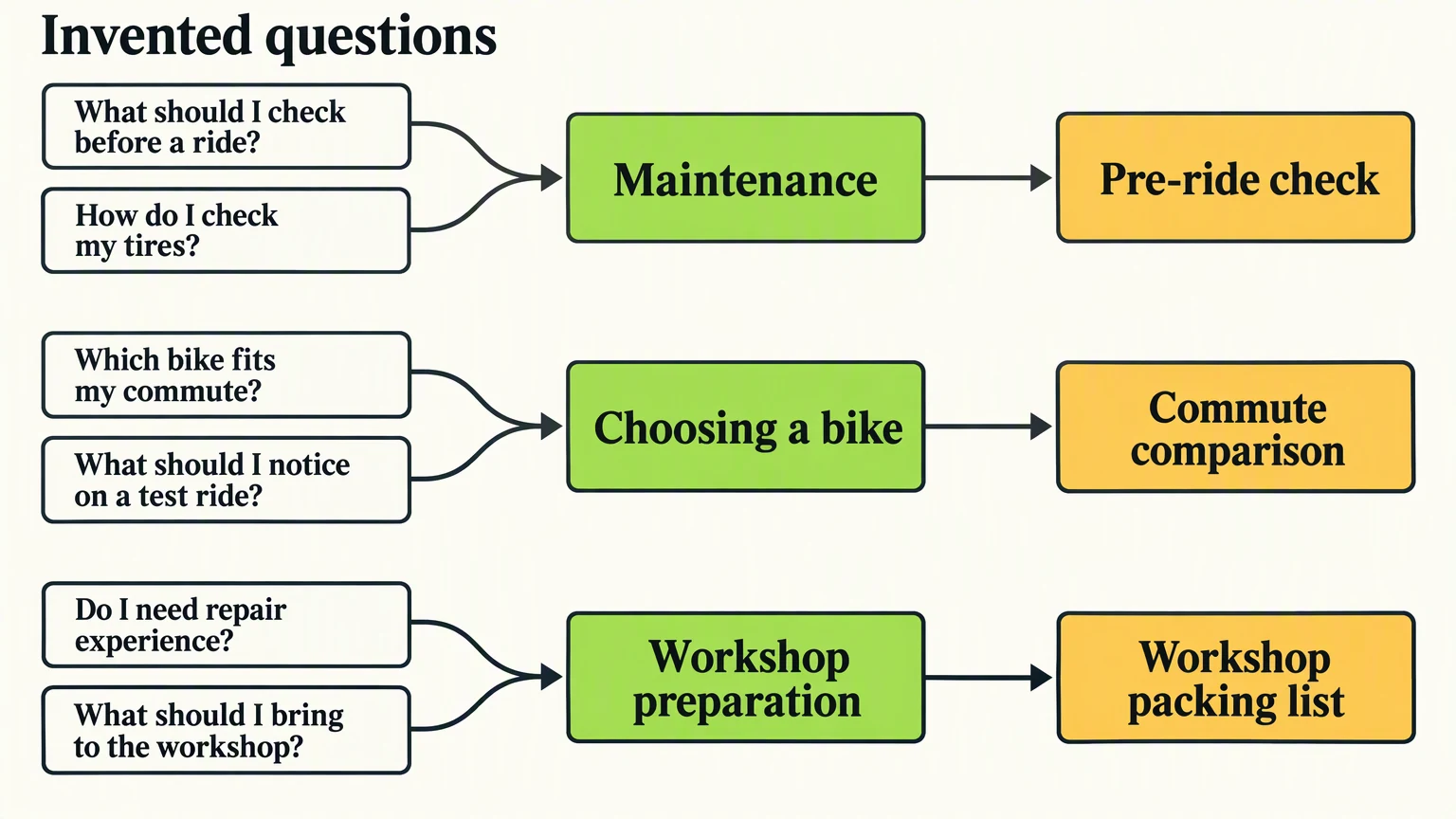
Illustrative example: The bike shop, all six customer questions, sample briefs, and post ideas in this example are invented. They show how to make the planning decisions, not findings from a real business.
The shop sorts its questions into maintenance, choosing a bike, and workshop preparation. Each group has a distinct job: help someone care for a bike, decide what to buy, or arrive ready to learn.
| Invented customer questions | Pillar | One useful post | Material to check before drafting |
|---|---|---|---|
| What should I check before a ride? / How do I check my tires? | Maintenance | Pre-ride check | Mechanic-reviewed checks and relevant manufacturer instructions |
| Which bike fits my commute? / What should I notice on a test ride? | Choosing a bike | Commute comparison | Current bike information and the shop's checked comparison guidance |
| Do I need repair experience? / What should I bring to the workshop? | Workshop preparation | Workshop packing list | Current workshop prerequisites, required items, and supplied equipment |
Read the sorting board from left to right: questions become a recurring subject, then a specific post. The subject is reusable; the post is one answer you can finish.
The maintenance post can include tire checks within a broader pre-ride checklist. The commute comparison can connect route needs with things to notice during a test ride. The workshop packing list can distinguish what attendees bring from what the shop supplies, with a clear note about prerequisites.
These labels also create boundaries. A workshop announcement belongs under workshop preparation when it explains who the session is for or how to attend. A staff birthday doesn't need to be squeezed into that pillar. You can publish occasional business news without inventing another permanent category.
How do you turn a pillar into a post you can finish?
Choose one question inside the pillar and decide what the reader should understand afterward. Then gather the facts before choosing a format.
For the shop's workshop packing list, the job is to help a prospective attendee arrive prepared. The source is the current workshop information, confirmed by the instructor. The post should separate required items from supplied equipment and direct readers to the current session details.
If the instructor hasn't confirmed the packing list, leave that post unready. Don't let a publishing slot push you into inventing an answer.
Copy this worksheet into a document or spreadsheet:
textPillar:
Customer situation:
Question this post answers:
One takeaway:
Source to check:
Facts confirmed:
Details still unknown:
Format and channel:
Useful next action:
Who checks the final version:
Review deadline:
Publish date, time, and time zone:
The worksheet separates the recurring subject from the individual assignment. That makes it easier to notice when a draft wanders into a different question or introduces an unsupported detail.
For the packing-list post, the format could be a short text checklist. Use a carousel only if separating the material across slides makes it easier to follow. A simple answer doesn't need a larger production job.
Move finished briefs into your calendar with an owner and a review deadline. The content calendar guide shows how to connect each audience question to sources, review, and publication timing. Keep broad subjects flexible while making the next batch specific.
Before drafting the next batch, read the replies and new inquiries. Use them to update the question list, not just to refill the same slots. That's the complete loop: collect, group, verify, publish, listen, and revise.
Where can Krew help with the first draft?
Once you've chosen the pillars and checked the facts, Krevaya AI writing can help turn your notes into a draft. Give Krew the topic, the people you want to reach, and the details that matter. You can share examples of your own writing, ask for a different angle, tighten the opening, or edit the wording yourself.
For the workshop post, make the request specific: draft a short checklist for prospective attendees using the approved workshop notes. Separate what to bring from what the shop provides, include the confirmed experience requirement, and end with a reference to the current session details. Leave any unanswered detail out rather than guessing.
Voice is a separate input from facts. Tell Krew how you normally explain things, but don't expect a friendly tone to resolve missing workshop information. The brand-voice brief helps you translate writing samples into observable language rules. In Krevaya, you can save preferences in your brand's voice settings, with a separate voice for each business or client.
Use Revise with AI for a broader rewrite, or open the caption to make small changes yourself. Check each channel's version in Posts, then approve it before scheduling.
Krevaya AI writing is available on Plus and higher plans. If drafting is your bottleneck, create your account and choose an AI plan, with a checked question brief ready to try.
How do you know a pillar is still useful?
Review pillars by what they help customers do, not by whether every category received an equal number of posts.
A preparation checklist might prompt practical follow-up questions. A bike comparison might reveal that customers need more help understanding their commute. A maintenance explanation might expose a point that needs a mechanic's clarification. Those observations suggest the next answer to prepare.
Keep a pillar when questions continue to arrive and you can answer them well. Narrow it when the label covers unrelated needs. Merge it when another pillar repeatedly produces the same material. Pause it when its facts or supporting resources aren't ready.
This method stops being useful when sorting becomes more work than answering. If you're an owner posting occasional answers to a small stream of inquiries, a running question list and manual drafting may be enough. There's no need to maintain a formal board or force every post into a category.
If repeated handling becomes the bottleneck, the social media automation guide explains how to automate a repeatable task while keeping review accountable. Automate the handling after the editorial decision is clear, not as a substitute for deciding what customers need.
Frequently asked questions
Can promotions or behind-the-scenes posts be content pillars?
They can be, but only when they serve a recurring customer need. Behind-the-scenes posts might explain how a service works; promotions might help people choose an appropriate offer. If the label only describes a format or sales activity, place those posts within a more useful customer-question pillar instead.
What if most customer questions fit into one pillar?
Keep one if it describes a clear, manageable subject. Split it only when the questions involve different decisions or audiences, such as choosing a product versus maintaining it. Don't add categories just to make the plan look balanced.
How often should I review my content pillars?
Check them when you plan the next batch and when the business changes its offers or services. Look for repeated new questions, overlapping answers, and missing source material. Keep useful pillars stable rather than renaming them after every post.
Sources & editorial details
Examples, diagrams, and downloadable worksheets are editorial teaching materials. They do not report customer results. Source-check dates appear below where recorded.
- Krevaya AI writing and ideas (checked November 01, 2026)
- A 30-day social media content calendar with room to do the work (checked November 01, 2026)
Created with AI assistance and published by Krevaya. Send corrections to [email protected].