Instagram comment-to-DM automation: build a useful first conversation
Build an Instagram keyword-comment flow that delivers a requested resource, waits for interaction before follow-ups, and leaves room for human help.
The short answer
Send the requested resource in the opening private reply, with a clear link or resource button. Wait for the person's interaction before sending follow-ups, and check the applicable messaging window. Keep marketing consent separate from resource delivery. Add a human handoff for questions, and use manual replies when automation would create more work than it saves.
What to take away
- Put the promised resource in the opening private reply; don't add an unexpected email gate or sales sequence.
- Separate resource access from interaction-dependent follow-ups, and let the resource-only branch stop.
- Assign a human owner, check exclusions and links, and pause the flow when the resource or delivery conditions change.
Start with the promise in your caption. If someone comments CHECKLIST to get a resource, the first DM should help them open it. That one decision makes the rest of the flow much easier to plan.
What should the keyword comment trigger?
Start with a narrow promise: a particular comment on a particular post earns a particular resource. Write that promise before building the automation.
For the illustrative pottery-studio example used throughout this guide, the caption says: “Comment CHECKLIST and we'll send you our glazing checklist by DM.” The opening message should deliver that checklist, not introduce an unrelated offer or require an email address first.
Specify these boundaries:
- Eligible post: The post offering the checklist, rather than every post on the account.
- Matching rule: The requested keyword, with exclusions for comments that shouldn't trigger delivery.
- Destination: The checked resource link and its current version.
- Exception owner: The person responsible for missing messages, broken links, and questions.
A comment containing the keyword isn't always a request. In this illustrative example, “I don't need the CHECKLIST” should not receive the same treatment as “CHECKLIST please.” Review likely variations before enabling automatic sending.
Our social media automation guide recommends defining a known input, a checkable output, and a failure response. Here, those are an eligible request, a usable opening reply, and a person who can investigate delivery problems.
What does a useful first conversation look like?
Keep the opening useful even if the person never replies again.
Illustrative example: a fictional pottery studio offering a glazing checklist. The resource is already published, reviewed, and accessible without an email gate. Its contents cover preparation questions rather than promising that one glazing method works for every clay body, glaze, or kiln.
Illustrative opening-message copy:
Here's the glazing checklist you requested. Choose Open checklist to view it. Have a question about using it? Ask a question by replying here, and our studio team can help.
The resource button is labeled Open checklist. Ask a question is an invitation to reply, not a second sales destination.
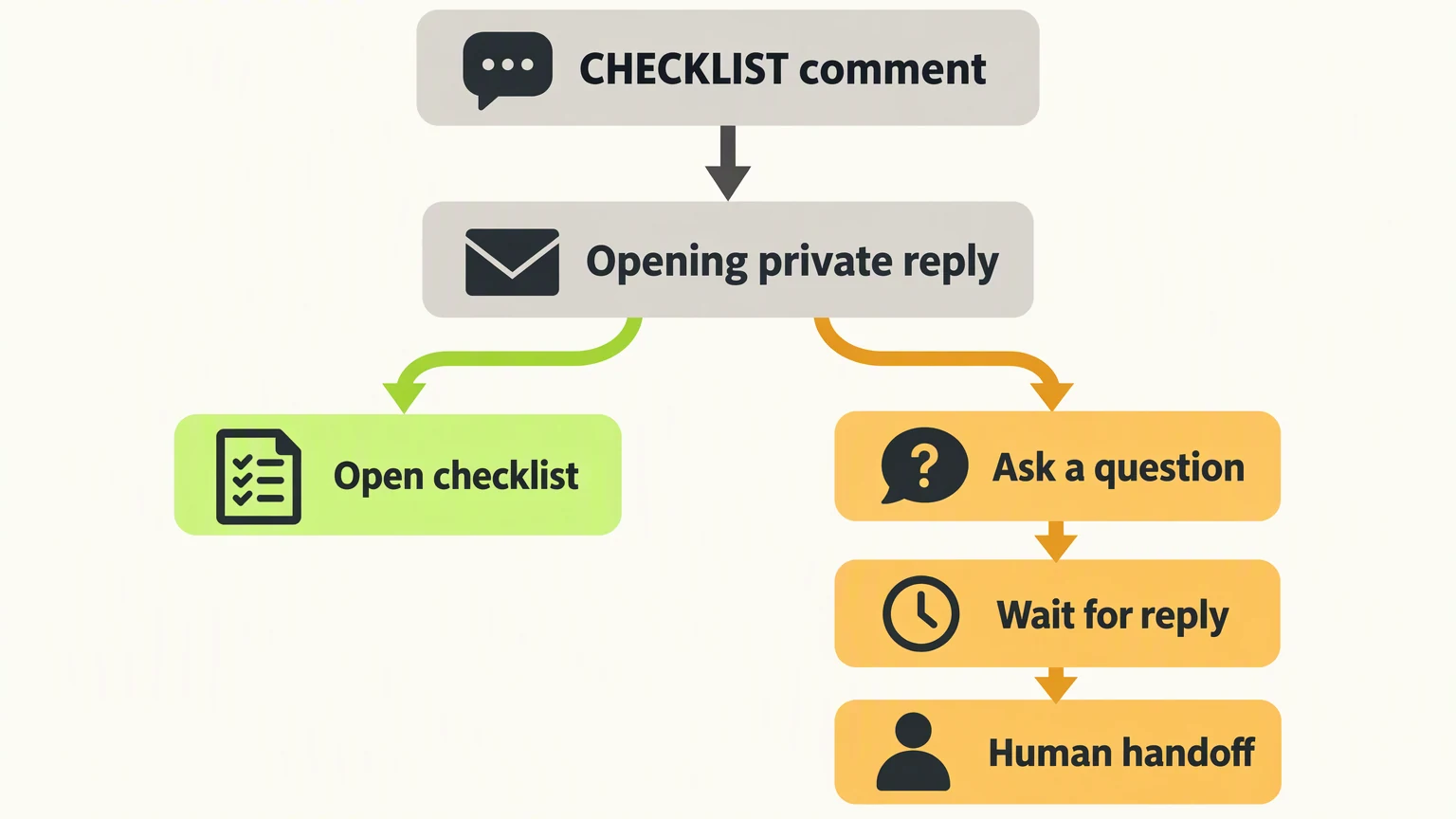
| Part of the illustrative flow | What happens | Boundary |
|---|---|---|
| CHECKLIST comment | The eligible comment triggers the opening private reply. | It doesn't start an unrestricted follow-up sequence. |
| Opening private reply | The message offers the resource button and an invitation to ask a question. | Deliver the promised resource without extra conditions. |
| Open checklist | The person opens the resource. | This path ends unless they separately interact. |
| Ask a question | The person is invited to reply with their question. | Wait for their reply before continuing. |
| Human handoff | A team member handles the question after interaction. | Check the applicable messaging window before sending. |
This is the fork shown in the instructional graphic: the same opening message offers a resource path and a conversation path. It does not send two different opening messages.
If the person only wants the checklist, let them leave with it. If they reply with a question about a glaze combination, the team should ask for the relevant details rather than let automation invent compatibility advice.
When can you send a follow-up?
Keep the opening private reply and subsequent messages as separate stages in your design.
Krevaya's Convo documentation states that follow-up messages wait for the person's interaction and respect Meta's messaging window. Build that dependency into the flow rather than placing a reminder immediately after the opening message.
Don't assume that clicking an external resource link authorizes another message. Link access and an interaction that permits follow-up are different things. Verify which supported interaction advances the conversation in your tool, and check the current applicable rules before enabling it.
For the illustrative pottery flow, the safest editorial choice is simple: the resource-only branch stops. The question branch waits for the person's reply, then moves to human help. A wait is a condition, not just a timer. Waiting a while doesn't turn silence into permission to continue.
Keep email collection separate too. Requesting a checklist shouldn't silently enroll someone in marketing. If you offer email delivery or a newsletter, explain what the email address will be used for and request explicit marketing consent where relevant. Don't make a free resource unnecessarily dependent on a subscription.
How do you check the flow before enabling it?
Review the whole experience, including the post that makes the promise. A clear private message won't repair a misleading caption.
Use this copyable worksheet. Fill it with your real decisions; it is an editorial planning aid, not a Krevaya product template.
textCOMMENT-TO-DM REVIEW WORKSHEET

Resource and current version:
Eligible post:
Keyword and excluded phrases:
Opening message:
Resource button label and destination:
Invitation to ask a question:
Interaction required before follow-up:
Current messaging-window check:
Human owner and handoff rule:
Email purpose and consent wording, if used:
Pause conditions:
Delivery and link checks:
Review date:
Before enabling the flow, check an intended request, an excluded phrase, a resource-only visit, a question reply, and a broken-link scenario. Confirm the destination works on a phone and that the resource matches the caption's promise.
Write a pause rule: if the resource is removed, the offer changes, or messages stop arriving as expected, pause the affected automation until someone reviews it. Inspect the conversation before retrying so recovery doesn't create duplicate messages.
For tone, use the AI brand voice guide to turn vague instructions such as “sound friendly” into observable rules. In this illustrative flow, those rules could be: name the resource directly, avoid pressure, and don't promise a response time the studio hasn't committed to.
When is a manual reply enough?
Manual delivery is sufficient when requests are occasional, the resource changes frequently, or most comments need interpretation. Keep a saved opening reply, paste the checked link, and answer questions yourself. You can still use the worksheet without buying automation software.
Automation becomes useful when the same clear request repeats and maintaining the flow takes less work than handling each delivery manually. Its tradeoff is ongoing maintenance: account access, matching rules, links, message copy, exceptions, and handoffs all need attention.
Compare total handling effort, including corrections and troubleshooting, rather than just counting automated starts. Resource access and useful questions are more informative than message volume, but neither alone proves a sale or a satisfied reader.
Use the social media content calendar guide to plan the resource post alongside a review date and an available conversation owner. Don't schedule an invitation to ask questions when nobody can take the handoff.
How does this map to Krevaya Convo?
Krevaya Convo is available on Essentials and higher plans. The Convo feature page describes a visual editor, keyword matching, opening private messages, interaction-dependent follow-ups, previews, and a shared inbox with human handoff.
If your account has Convo access, here's how to put the flow together:
- Connect the right account. Convo uses connected Instagram professional accounts and Facebook Pages. Trigger delivery depends on account permissions and webhook subscriptions.
- Limit the trigger. Choose the relevant post, configure keyword matching, and add exclusions. A public acknowledgment is optional; keep it factual if you use one.
- Build the opening. Add the resource message and supported button. Keep the question invitation clear, then place subsequent messages behind the required interaction.
- Set the human route. Use the inbox, assignment, and pause controls for questions that need personal attention. The studio's owner and escalation rule remain editorial decisions.
- Preview, review, and observe. Convo offers review mode and automatic sending. Start with review, then consider automatic sending only after checking the flow. Reports include starts, completed flows, captured answers, and tracked link clicks.
The method stops being useful when the request needs judgment more than routing. A complaint, unclear glazing question, or account problem should reach a person, not another automated branch. Create your account and choose a plan from the feature page to build this workflow. You can also use the same opening message as a saved manual reply.
Frequently asked questions
Does opening the checklist link allow me to send another DM?
Don't assume it does. Opening an external link and an interaction that permits follow-up are different events. Verify the supported interaction and applicable messaging window. The recommended resource-only branch ends unless the person separately interacts.
Should I collect an email address before sending the resource?
Not if the post simply promises to send the resource by DM. Deliver that promise first. If you offer email delivery or marketing, explain the purpose and request consent separately rather than treating the keyword comment as a subscription.
Can I keep the flow in review mode before enabling automatic replies?
Yes. Convo offers review mode and automatic sending. Start with review mode, check the keyword rules and resource link, and make sure someone can take over when a conversation needs a personal answer.
Sources & editorial details
Examples, diagrams, and downloadable worksheets are editorial teaching materials. They do not report customer results. Source-check dates appear below where recorded.
- Krevaya Convo: comment-to-DM automation, early access (checked October 22, 2026)
- Social media automation: what to automate and how to measure it (checked October 22, 2026)
Created with AI assistance and published by Krevaya. Send corrections to [email protected].