How to plan an Instagram carousel people can actually use
Give every carousel slide a job. Use a plant-shop diagnosis storyboard, a copyable planning worksheet, and a final review checklist before designing.
The short answer
Plan an educational carousel around a decision: establish the situation, guide the reader through relevant checks, interpret the findings, and give a proportionate next step. Finish with a reference worth revisiting. Write the sequence before designing, include a route for uncertain findings, and use fewer slides when the task doesn't require several checks.
What to take away
- Assign every slide a distinct job, then check that the sequence moves from observations to a supported decision and action.
- Show the rule behind each recommendation and include a separate route for conflicting or missing findings.
- Verify illustrative assumptions before publication, then review the finished carousel for matching visuals, readable cautions, and correct page order.
Put a recognizable situation on the first slide, give each relevant check its own slide, then explain how the findings lead to a decision and a next step. Finish with a useful reference. Choose the slide count from those jobs, not from the empty pages in a template.
What decision should the reader be able to make?
Write the decision before writing the cover. A topic tells you what the post is about. A decision tells you what someone can do with it.
For our illustrative plant-shop example, the topic is yellow leaves. The useful decision is narrower: which care condition deserves attention before the reader changes anything?
The shop wants to explain three possible causes: unsuitable light, a watering mismatch, and crowded roots. Treat these as candidates to investigate, not a complete diagnosis based on leaf color. Before publication, the actual care advice needs plant-specific sources and knowledgeable review.
Use this planning sentence:
After reading, someone should be able to inspect ___, distinguish ___, and choose ___.
Here, the reader should inspect light, soil moisture, and possible root crowding; distinguish a recorded care mismatch from an uncertain finding; and choose a supported adjustment or ask for help.
That boundary gives the carousel a useful job without making an oversized promise. It can organize observations. It can't establish the cause of every yellow leaf or replace an assessment when several explanations fit.
What should go on each slide?
Build the storyboard in plain text before opening an editor. Each slide needs a job, a message, and a reason the next slide follows.
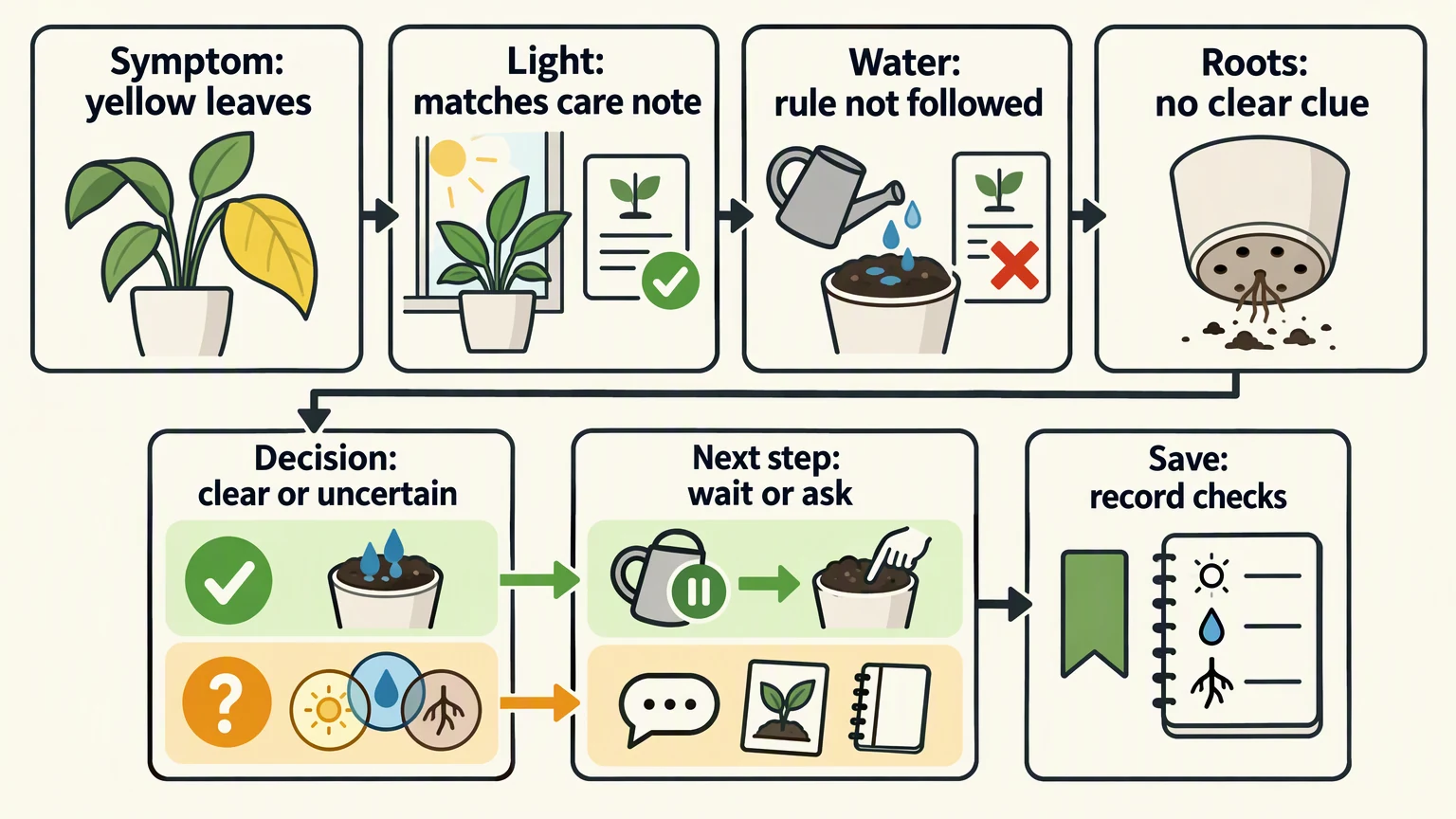
The following illustrative seven-card sequence assumes a hypothetical care note for the plant shown: wait until a specified soil layer is dry before watering again. In this example, the owner recorded watering yesterday while that layer was still damp. The layer remains damp today. This is an illustrative planning assumption, not verified horticultural guidance. Replace it with sourced instructions for the actual plant before publishing.
| Card | Job | Illustrative slide copy |
|---|---|---|
| 1. Symptom | Establish the situation and limit the promise. | Yellow leaves? Check before changing care. Identify your plant first. |
| 2. Light | Compare an observation with the care note. | Does the current light match this plant's guidance? In this example, it does. |
| 3. Water | Identify a specific mismatch. | The owner watered yesterday while the soil layer named in the care note was still damp. That conflicts with the note's instruction to wait until it is dry. |
| 4. Roots | Gather another clue without prescribing treatment. | Check for visible root crowding. This example has no clear root clue; that doesn't rule out a root problem. |
| 5. Decision | Interpret the checks. | The recorded watering did not follow the care note. Investigate that mismatch first. Multiple mismatches, incomplete checks, or no explanatory mismatch need further assessment. |
| 6. Next step | Give an action for each outcome. | Under this care note, don't water yet. Recheck the specified soil layer. With mixed, incomplete, or unexplained findings, record the observations and ask for plant-specific help before changing care. |
| 7. Save | Provide a reusable reference. | Save the check order: light, water, roots. Record the findings and the care rule before choosing an action. |
Keep checking after finding a mismatch. It may not be the only issue, and the reader needs the remaining observations before interpreting the result.
The reasoning should be visible:
- Observation: The owner watered yesterday while the specified soil layer was damp; the layer remains damp; light matches the care note; there is no clear root clue.
- Interpretation: The recorded watering conflicts with the example's care rule. That identifies a real mismatch to investigate, not a proven cause of the yellow leaves.
- Proportionate action: Wait rather than add water, then recheck against the same rule. Don't change the light or repot based on these findings alone.
If all completed checks match the care guidance and there is no clear root clue, the yellowing is still unexplained. Record the observations and ask for plant-specific help if it persists. Completed checks are not proof that the plant or its roots are healthy.
Now change the illustrative case: the light also fails its check, or the reader can't complete the root check. The result becomes mixed, insufficient, or unexplained findings. Record the plant identity, observations, recent care changes, and photos; ask a knowledgeable person to help interpret them rather than changing several conditions at once.
The hero storyboard separates these routes. Its lime check mark means a recorded care-rule mismatch, not a confirmed diagnosis. That route leads to waiting and rechecking under the example note. Its amber question mark means mixed, insufficient, or unexplained findings and leads to collecting context and asking for help. The final bookmark and notebook represent saving the check order and recording observations.
How do you keep the slides readable without losing the reasoning?
Keep one main job on each slide. The water card needs the observation and the rule it is being compared with. It doesn't also need fertilizer advice, a seasonal calendar, and a sales offer.
Use consistent placement for repeated information. Put the check name, observation, and necessary caution in predictable positions across the light, water, and roots slides. Give the decision slide a different treatment so readers notice the move from gathering evidence to interpreting it.
Choose visuals that explain what to inspect. A soil detail or drainage-hole view can help; a decorative plant photo may not. Don't draw crowded roots on a card whose example has no clear root finding, or use a window illustration to imply that the same lighting suits every plant.
Krevaya's brand-voice guide recommends separating factual inputs from style rules. Apply that here: friendly wording can soften the delivery, but it can't turn “possible mismatch” into “this is definitely the cause.”
Preview the finished carousel at phone-viewing size. If a caution is necessary to understand the action, keep it readable on the slide rather than hiding it in the caption. Shorten or split the explanation instead of shrinking the type.
Make the final card useful even when someone returns later. “Save this” alone isn't a reference. “Check light, water, roots; record findings before changing care” tells the reader what they're saving.
What should you put in the planning worksheet?
Keep the intended decision and source boundaries beside the draft. Copy this into a document:
textReader and starting situation:
Decision this post should support:
What the post cannot establish:
Approved facts, sources, and dates:
Illustrative assumptions to replace or verify:

For each slide:
- Job:
- Draft headline:
- Observation or explanation:
- Rule used to interpret it:
- Visual that helps the task:
- Necessary caution:
- Why the next slide follows:

Recorded care-rule mismatch route:
Conflicting or missing-finding route:
Completed checks but no explanatory mismatch route:
Proportionate next action for each route:
Useful final reference cue:
Subject-matter reviewer:
Final design reviewer:
Review deadline:
Publication date and timezone:
This is an editorial worksheet, not a built-in Krevaya feature.
Before approving the design, check:
- Promise: Does the cover match the decision the post actually supports?
- Progression: Does every slide add an observation, interpretation, or action?
- Evidence: Is each factual rule supported by an appropriate source rather than an illustrative assumption?
- Decision: Can the reader explain why the observation leads to the suggested action?
- Uncertainty: Are the routes for conflicting findings, missing observations, and completed checks with no explanation explicit?
- Final design: Do the text, illustrations, page order, and readable cautions still agree?
For the plant example, stop the self-guided sequence if the reader can't identify the plant, perform the checks, or apply the care rule. Collecting context and asking for help is a useful outcome, not a failed carousel.
When is a simpler workflow enough?
A carousel requires more writing, design, and review than a single post. We recommend it when order matters or the next action depends on several observations. If the answer is one instruction with a short explanation, a single graphic or caption is sufficient.
For an occasional carousel, a shared document, paper sketch, and manual page-by-page review may be all you need. Software won't repair missing evidence or a decision that doesn't follow from the checks.
Put the source-review deadline and publication slot in your social media content calendar. Leave room to correct both copy and visuals. If you later automate preparation or scheduling, use the social media automation guide to plan review gates rather than treating a completed draft as ready to publish.
The method also stops being useful when the explanation needs too many exceptions to stay readable. In that case, make the carousel a short observation checklist and point readers toward a fuller, reviewed resource or an appropriate person for help. Don't squeeze a complex assessment into tiny type.
How can you build the approved plan in Krevaya Studio?
Once the sequence and factual advice are approved, move into design. Krevaya Studio's product page describes carousel templates, editable text and design layers, brand-color accents, and editing carousel pages together as one design. New visitors can create an account and choose a plan to start using Studio.
If you have access, start with a carousel template or your own media. Replace the sample copy with the approved storyboard, then adjust each page's text, images, and layout. Keep a consistent pattern for the observation cards and distinguish the decision card.
Review the finished carousel, not just its text document. Confirm that the mismatch and uncertain-finding routes remain understandable after layout changes, and check the available delivery options in your access version.
If you don't have access, use the same storyboard in your existing editor. The useful method is the observation-to-decision sequence, not the tool used to draw it.
Frequently asked questions
How many slides does my educational carousel need?
Use enough slides to complete the task without repetition. The illustrative plant example uses a symptom, three checks, a decision, a next step, and a reference cue. If your answer needs only one instruction and a short explanation, use a single graphic or caption instead.
What belongs on the decision slide when several checks produce clues?
Name the result as mixed or uncertain and explain the next action. In the illustrative plant example, the reader records the findings and asks for plant-specific help instead of changing light, watering, and pot size together. The same ask-for-help route applies when checks are complete but do not explain the symptom.
Can I ask AI to write the slide copy?
Yes. Supply the reader's decision, each slide's job, approved factual sources, and claim limits. Treat the output as a draft. Verify the advice before designing, then check that the finished slides preserve the reasoning and uncertainty.
Sources & editorial details
Examples, diagrams, and downloadable worksheets are editorial teaching materials. They do not report customer results. Source-check dates appear below where recorded.
- Krevaya Studio: carousel templates, page editing, and early-access status (checked October 22, 2026)
- Krevaya Fieldnotes: separating factual inputs from brand-voice rules (checked October 22, 2026)
Created with AI assistance and published by Krevaya. Send corrections to [email protected].