How to choose social media automation tools: a buyer's scorecard
Compare social media automation tools by workflow, channels, AI writing, approvals, and total effort. Includes a weighted scorecard and a practical trial plan.

The short answer
The best social media automation tool is the one that handles your actual bottleneck, supports your required accounts and formats, and leaves you with publishable work at an acceptable total cost. Compare scheduling, content creation, approvals, and reporting separately. Test shortlisted tools with the same brief and measure editing effort before choosing.
What to take away
- Treat required channels, formats, and controls as pass-or-fail requirements.
- Compare the cost of a finished, approved post rather than a generated draft.
- A simple native scheduler can be sufficient when content creation is already working.
Start with the job you need the tool to do
A solo founder with no content backlog and a social team with fifty approved assets have different problems. The founder may need help turning expertise into posts. The team may need account permissions, scheduling, and clear handoffs. A large feature list does not tell either buyer which tool will remove their bottleneck.
Write down where your last five posts spent the most time. If you were waiting for ideas, evaluate sourcing and drafting. If you had finished posts but missed the schedule, evaluate publishing. If several people rewrote the same caption in different documents, evaluate approvals and version clarity.
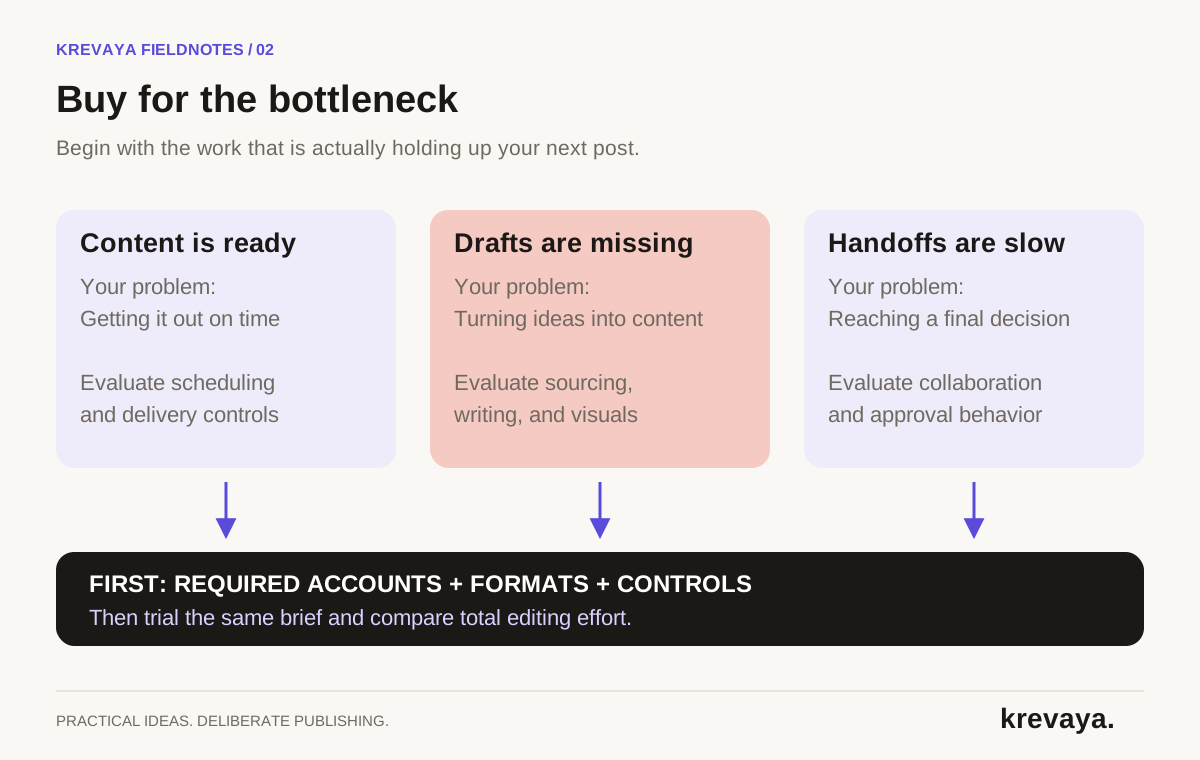
| Your situation | Start by evaluating | Proof to request |
|---|---|---|
| I have approved content, but posting is inconsistent | A native or dedicated scheduler | A real scheduled post in your required format |
| I spend most of my time deciding what to say | An AI content and workflow tool | A useful draft from your own source material |
| Posts get stuck between contributors | A collaboration and approval system | The actual reviewer and permission flow |
| I cannot connect posting to results | Reporting and measurement capabilities | Metrics and exports for your accounts |
A practical shortlist: native tools, Buffer, Hootsuite, Sprout Social, and Krevaya
This is a comparison of documented capabilities and potential fit, not a hands-on ranking. We publish Krevaya, so our perspective is that of a vendor. The external product pages linked below were checked on September 20, 2026. Plan packaging, account support, and prices can change; confirm the exact plan before buying.
| Option | Documented emphasis | When to investigate it |
|---|---|---|
| Native scheduling | LinkedIn documents scheduling within the platform | You use few channels and already have finished content |
| Buffer | Publishing, a content calendar, platform customization, and AI writing assistance | You want a publishing-centered workflow across a broad channel mix |
| Hootsuite | A publishing calendar, scheduling, AI assistance, and collaboration | You need to coordinate planning and publishing across a team |
| Sprout Social | Publishing, asset management, suggested send times, and approval workflows | You have structured publishing operations and multiple stakeholders |
| Krevaya | Trends, voice-informed drafts, visuals, review, scheduling, and analytics | You want help creating content as well as getting it published |
See LinkedIn's scheduling instructions, Buffer Publish, Hootsuite publishing, and Sprout Social publishing for the vendors' current descriptions. These sources establish available capabilities, not comparative performance.
A broader scheduler may be the better fit if your must-have channel is outside Krevaya's public publishing catalog. A team-oriented suite may suit a complex approval organization better; test the specific permissions you need. If you only need to send a few prepared posts, native scheduling deserves a trial before a new subscription.
Krevaya is worth evaluating when research, writing, visuals, and review are the expensive steps. Access is currently through the waitlist, which matters if you need to onboard immediately. Do not assume an available feature page means instant self-serve access.
Check these requirements before scoring any tool
- Exact account support. A company Page, a personal profile, and a creator account can have different capabilities. Test the account type you actually own.
- Exact content format. A network logo does not prove support for every carousel, Story, video, link, or native effect you use. Distinguish direct publishing from a reminder that requires finishing in the app.
- Approval behavior. Create an unapproved draft and confirm it stays unpublished. Check what happens after an approved draft changes.
- Ownership and access. Determine who can publish, who can approve, and whether the product can support your actual client or brand separation needs.
- Data and exit needs. Check export options, available reporting history, disconnection, and account deletion before committing your process to the tool.
A failed requirement should disqualify the tool for that workflow even if it wins on price or design. Weighting cannot rescue missing support for your primary channel. Keep a written list so a polished demo does not quietly change your criteria.
Use a weighted scorecard for the tools that qualify
After the pass-or-fail checks, score each area from zero to five. Zero means the tool cannot complete the task; three means it works with acceptable manual steps; five means it completes your test well with little extra work. Assign scores from observed behavior, not from a sales promise.
| Criterion | Weight | What to observe |
|---|---|---|
| Draft quality and source fidelity | 25% | Accuracy, useful specificity, and retained meaning |
| Brand voice and editing effort | 20% | Time needed to make the draft sound like your business |
| Scheduling and delivery | 20% | Timezone clarity, format support, and failure visibility |
| Review and control | 15% | Clear approval state and easy correction |
| Measurement and export | 10% | Usable results for your actual accounts |
| Total operating cost | 10% | Subscription, add-ons, and remaining manual effort |
Calculate the score out of 100 as the sum of each score divided by five, multiplied by its percentage weight. For example, a four out of five in draft quality contributes twenty points when its weight is twenty-five. Change the weights before the trial if your main challenge is team coordination or reporting.
Run the same real-world trial in every tool
Use one piece of content you own, one brand brief, and two required output formats. Include a detail an AI writer must preserve, such as a product limitation or an offer's expiration date. Include a sentence that must not appear, such as an unsubstantiated performance claim. This reveals how much checking the output needs.
- Prepare the test. Collect the source, voice examples, approved facts, image, required accounts, and the same target publication times.
- Create the drafts. Track the time from opening the task to a version you would publish. Include setup, edits, image work, and platform adaptation.
- Test review. Hold one draft, reject another, edit a third, and approve only the correct final versions. Inspect what is actually scheduled.
- Test delivery. If you have an appropriate test account, publish a harmless post and inspect the result. Otherwise verify supported behavior without publishing to a live audience.
- Inspect exceptions. Ask how expired connections and failed posts are surfaced. Confirm what a retry does and whether a human can tell that delivery is unresolved.
- Compare results. Score each product, record the manual steps, and identify which limitations you can live with.
Do not move the whole calendar during a trial. A small test provides a better comparison and avoids making migration effort part of the decision. Save both the first draft and approved version so you can see whether the apparent quality came from the tool or from your rewrite.
Compare total cost, including the work left over
Subscription price is only one input. Account fees, extra seats, generation allowances, setup time, and editorial effort can change the effective cost. Use a hypothetical internal hourly value to compare options, while recognizing that time saved is not automatically cash saved.
Read the current Krevaya pricing page for plan details instead of relying on a price quoted in an old article. Repeat that check for every vendor, especially when a feature you need is available only on a particular tier.
Make the decision you can explain in one sentence
A useful decision sounds like this: we chose this tool because it supports our two required formats and reduces the time from source note to approved post. A weak decision sounds like this: it has more AI features. Keep your written reason and revisit it after your first month.
If the trial exposes a process problem, fix that first. No product can decide which of three stakeholders has final approval unless your team decides it. Use the approval workflow guide to settle ownership, then use the automation guide to map the whole routine.
Frequently asked questions
What is the best social media automation tool for a small business?
The best fit depends on your channels and bottleneck. Native scheduling can suit a business with ready-to-publish content. A broader scheduler helps coordinate channels. A content workflow tool such as Krevaya is worth evaluating when sourcing, writing, visuals, and review consume most of the work.
Which features should an AI social media tool include?
Look for accurate drafts from your own sources, usable voice controls, platform-specific outputs, a clear review step, reliable scheduling, and useful reporting. Treat required account types and formats as hard requirements. Test the features on your own content before choosing.
Is a paid scheduler necessary for one social account?
Not always. If native scheduling covers your format and you can manage the content yourself, a paid scheduler may add little value. Consider additional software when it removes enough recurring work or provides a capability your existing setup lacks.
Does this guide rank tools from hands-on testing?
No. The shortlist summarizes the vendors' documented capabilities, checked on September 20, 2026. The scorecard and trial process are provided so you can compare the tools against your own requirements. Krevaya is the publisher of this guide.
Sources & editorial details
Product and source pages checked September 20, 2026. Practical templates and worked examples are editorial guidance, not measured customer results.
- Buffer: publishing capabilities
- Hootsuite: publishing capabilities
- Sprout Social: publishing capabilities
- LinkedIn Help: schedule posts
Created with AI assistance and published by Krevaya AI. Send corrections to support@krevaya.com.